Updated
How we compared them
Every fact about another app comes from that company's website, help centre or store listing, read on 15 October 2026 and listed under Sources. Prices are in US dollars as the US pages showed them. Where a company's own pages disagree with each other, we say so. This page compares published facts; we have not run timed hands-on tests of every app.
Flowo is made by BBMM Technologies Inc., the company that publishes this page. Read the Flowo entry with that in mind.
Pick by situation
- One free tool to break down a scary task: Goblin.tools.
- A visual plan you arrange yourself, on many devices: Tiimo or Structured.
- Lists on every device, with a free plan: Todoist or TickTick.
- Work planned across calendars and desktop apps: Motion, Sunsama or Amazing Marvin.
- A phone plan that keeps breaking by late morning: Flowo.
Tiimo: a visual planner on many devices
Tiimo calls itself "a visual AI planner built for real life". It runs on iPhone, iPad, Apple Watch, Mac, Android and the web. The free version, on iOS and Android, includes the basic planning tools. Tiimo Pro is US$54 a year on the US App Store; two US App Store pages show different monthly prices, US$12 and US$14. The 7-day trial comes with the yearly plan only.
When the day changes, you ask the AI co-planner to reshuffle it, for example to move every task ten minutes later, and Review Today offers to move unfinished tasks ahead. The co-planner also breaks tasks into steps with time estimates.
Best for people who like to see and shape the plan themselves and want it on every screen they own.
Structured: a timeline with a Replan button
Structured "combines all your tasks and to-dos into a single visual timeline". It runs on iPhone, iPad, Mac, Apple Watch, Apple Vision Pro, Android and the web, and it has a free plan. Its help centre does not list prices because they vary by region; the US App Store lists monthly, yearly and lifetime options, including a lifetime purchase at US$99.99.
Replan, a Pro feature on Apple devices, lets you decide task by task what happens to unfinished work: reschedule it, move it to the inbox, delete it or check it off. Calendar import is part of Pro.
Best for a clean visual timeline and anyone who prefers paying once to a subscription.
Motion: automatic re-planning for work
Motion's home page promises to "automatically re-plan your day whenever anything changes", and its help centre says past-due tasks move to the next free slot. It runs on iPhone, Android, Mac, Windows and the web, and syncs with Google, Outlook and iCloud calendars. There is no free plan. The pricing page shows Pro AI at US$19 and Business AI at US$29 per seat per month without saying which billing period those figures use; the US App Store lists US$44.99 a month or US$294.99 a year, with a 7-day trial.
Best for people and teams whose work lives in calendars and projects across desktop and phone.
Sunsama: a daily planner for professionals
Sunsama describes itself as a daily planner "for modern professionals". It has apps for iPhone, Android, Mac, Windows and Linux, and syncs with Google, Outlook and Apple calendars. There is no free plan; the trial lasts 14 days with no card. Its pricing card shows US$17 a month billed yearly or US$22 billed monthly, while the FAQ on the same page says US$20 and US$25.
Unfinished tasks roll over to the next day at midnight, and timeboxes shift automatically when they clash with another task.
Best for knowledge workers who plan each day across many tools and want desktop apps, Linux included.
Amazing Marvin: a planner you configure
Amazing Marvin calls itself "the customizable personal productivity app for people who think differently". It runs on Mac, Windows, the web, iPhone and Android, with two-way calendar sync. It costs US$8 a month or US$96 a year, with a 14-day trial and no free plan.
Planning methods come as "strategies" you switch on. One of them moves unfinished scheduled tasks to today at midnight, and a reschedule dialog lists everything left in the past.
Best for people who want to build their own system piece by piece.
Goblin.tools: free help with one task at a time
Goblin.tools is "a collection of small, simple tools, for when things feel too big or complicated". Magic ToDo breaks a task into steps, and Estimator guesses how long something will take. Compiler turns a brain dump into actions. The website is free with no ads or paywalls. The iPhone and Android apps cost a small one-off price (the App Store shows US$1.99 and the website says US$2.99), and an optional Pro plan at US$3.99 a month or US$39.99 a year adds sync and templates.
It does not schedule anything, so there is no plan to rebuild when the day changes.
Best for getting unstuck on a single task, for free, in a browser.
Todoist: lists everywhere
Todoist runs on the web, Mac, Windows, Linux, iPhone, Android, Apple Watch and Wear OS. The free Beginner plan includes five personal projects and calendar sync with Google or Outlook. Pro has cost US$7 a month or US$60 a year since 10 December 2025, according to its help centre. Task Assist, on paid plans, breaks a task into sub-tasks on the web and desktop apps.
Overdue tasks are postponed by hand; the Today view guide suggests moving them to tomorrow or later in the week.
Best for a reliable list on every device, with a useful free plan.
TickTick: a large free plan
TickTick runs on iPhone, Android, Mac, Windows, Linux, the web and as a browser extension. The free plan allows 9 lists with 99 tasks each. Premium is US$49.99 a year on its website, and the US App Store also offers US$4.99 a month. A Timeline view sizes tasks by their durations, and Google Calendar integration is listed.
We found no official page describing what TickTick does with unfinished tasks when the day changes.
Best for a capable list app with timeline and calendar views at a low price.
Flowo: a phone planner that rebuilds the rest of today
Flowo is software for neurodivergent people that automates daily planning and provides support when plans change. It runs on iPhone and Android. You give tasks durations and deadlines and add fixed events, meals and sleep, and the scheduler places the tasks in the time that remains by fixed rules on the phone.
When a task runs over, Recovery runs the planner again on the hours that remain, keeps fixed events in place and shows what moved. A task that can no longer fit before its deadline carries a No room badge with roughly how much time is missing. The free plan includes 7 Recovery runs and 5 Tidy Up runs a week.
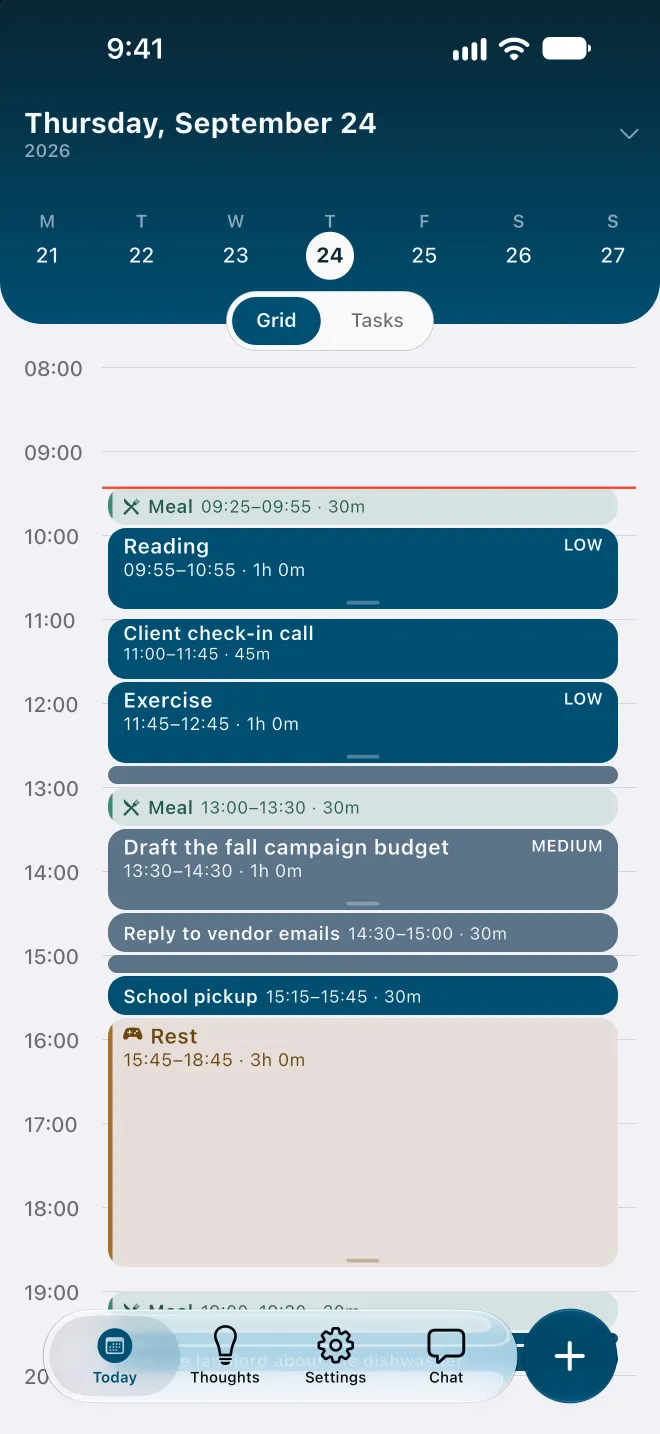
Best for people who plan on a phone and whose plan tends to break during the day. Pick another app if you need a Mac, Windows or web app, calendar import, shared plans or team features; Flowo has none of these today.
Side by side, as of 15 October 2026
| App | Platforms | Free option | Paid price (US) | When a task runs over |
|---|---|---|---|---|
| Tiimo | iPhone, iPad, Watch, Mac, Android, web | Free version on iOS and Android | US$54 a year on the App Store | You ask the AI co-planner to reshuffle |
| Structured | iPhone, iPad, Mac, Watch, Vision Pro, Android, web | Free plan | Shown in the app; lifetime option US$99.99 on the App Store | Replan button, task by task (Pro, Apple devices) |
| Motion | iPhone, Android, Mac, Windows, web | No; 7-day trial on the App Store | From US$19 per seat a month on its site | Re-plans automatically |
| Sunsama | iPhone, Android, Mac, Windows, Linux | No; 14-day trial | US$17 to US$22 a month (FAQ says US$20 to US$25) | Unfinished tasks roll over at midnight |
| Amazing Marvin | Mac, Windows, web, iPhone, Android | No; 14-day trial | US$8 a month or US$96 a year | Optional rollover at midnight; reschedule dialog |
| Goblin.tools | Web, iPhone, Android | Website free | Apps US$1.99 to US$2.99 once; Pro optional | Does not schedule |
| Todoist | Every major platform and watches | Beginner plan | US$7 a month or US$60 a year | You postpone overdue tasks |
| TickTick | Every major platform and the web | Free plan | US$49.99 a year | Not described on its official pages |
| Flowo | iPhone, Android | Free plan with 7 Recovery runs a week | US$7.99 a month, US$49.99 a year or US$89.99 once | Recovery rebuilds the rest of today and shows what moved |
Trying Flowo
Flowo is free to download on the App Store for iPhone and on Google Play for Android. Flowo Pro is an optional in-app purchase: US$7.99 a month or US$49.99 a year, both starting with a 14-day free trial that needs a payment method, or US$89.99 once with no trial. Your store shows the local price before you confirm.
For a closer look at single comparisons, see Flowo and Tiimo, Flowo and Structured and Flowo and Motion. The guide to executive-function support apps explains what any of these tools can and cannot do.
Questions
What is the best planner app for ADHD?
It depends on which part of the day goes wrong. Goblin.tools is a free way to break down one task, Tiimo and Structured suit people who like a visual plan they arrange, Motion suits work spread across calendars, and Flowo suits a phone plan that breaks during the day.
Which ADHD planner apps are free?
Goblin.tools is free on the web, and Todoist, TickTick, Structured and Tiimo have free plans or versions. Flowo is free to download, with 7 Recovery runs a week on the free plan.
Which planner re-plans the day automatically?
Motion says it re-plans your day automatically whenever anything changes. Sunsama and Amazing Marvin move unfinished tasks at midnight, Structured offers a Replan button on Apple devices, and Flowo rebuilds the rest of today when you run Recovery.
Is this comparison biased toward Flowo?
Flowo is ours, so read it with that in mind. Every fact about the other apps comes from their own websites or store listings, dated, and each entry names what that app does better.
Do any of these apps have evidence that they work?
We found no controlled trial results on the official pages of these apps, and Flowo has none. A 2020 review of 109 apps marketed for ADHD found none that reported evidence of efficacy.
Sources
- Tiimo home page, accessed 2026-10-15
- Tiimo FAQ, accessed 2026-10-15
- Tiimo AI planning, accessed 2026-10-15
- Tiimo on the App Store, accessed 2026-10-15
- Structured home page, accessed 2026-10-15
- Structured help: buying Pro, accessed 2026-10-15
- Structured help: Replan, accessed 2026-10-15
- Structured on the App Store, accessed 2026-10-15
- Motion pricing, accessed 2026-10-15
- Motion home page, accessed 2026-10-15
- Motion downloads, accessed 2026-10-15
- Motion on the App Store, accessed 2026-10-15
- Sunsama pricing, accessed 2026-10-15
- Sunsama help: task rollover, accessed 2026-10-15
- Amazing Marvin pricing, accessed 2026-10-15
- Amazing Marvin help: rollover, accessed 2026-10-15
- Amazing Marvin features, accessed 2026-10-15
- Goblin.tools about, accessed 2026-10-15
- Goblin Tools on the App Store, accessed 2026-10-15
- Todoist pricing update, December 2025, accessed 2026-10-15
- Todoist pricing, accessed 2026-10-15
- Todoist help: Today view, accessed 2026-10-15
- TickTick upgrade page, accessed 2026-10-15
- TickTick features, accessed 2026-10-15
- Păsărelu, Andersson and Dobrean (2020), ADHD mobile apps: a systematic review, accessed 2026-10-15