Motion alternative
Looking for a Motion alternative? How Flowo compares
Motion and Flowo both put your tasks on a schedule for you, and both re-plan when the day changes. They are built for different jobs. This page compares them using Motion's own pages, fetched on 23 September 2026, and Flowo's published behaviour, so you can pick the one that fits the day you actually have.
Updated
The short version
- Motion presents itself as a work platform for individuals and teams, with scheduling, projects, meetings, docs and reports in one product. Its pages describe its scheduler as AI.
- Flowo is a personal day planner for iPhone and Android. Its scheduler follows fixed rules on your phone, puts sleep, meals and rest in first, and tells you which tasks no longer fit.
- Price. On the day we checked, Motion's Pro AI plan for one person was listed at $29 a month billed annually. Flowo Pro is US$49.99 a year, and the planner itself is free to download.
If you plan work with a team, Motion covers ground Flowo does not. If you want one calm view of your own day, including the parts that are not work, read on.
What Motion says it does
Everything in this section comes from Motion's website as it read on 23 September 2026. Links are in the sources list at the end. Motion may have changed its pages since.
- Its home page is titled "The AI Powered SuperApp for Work" and says "Motion is built for individuals and teams of all sizes".
- The AI Calendar page says Motion "instantly recalculates your schedule when plans change", plans tasks "based on deadlines, duration, and priorities", and "flags when you've scheduled more than you can handle".
- The AI Task Manager page says it schedules around "deadlines, priorities, dependencies", lets you "create custom time windows for your tasks", and warns you when it thinks a task is at risk of missing its deadline.
- The pricing page lists two plans, Pro AI and Business AI, priced per seat per month, with a "Pay annually (Save 33%)" option. Pro AI lists "AI Calendar & Meetings", "AI Task Planner", "iOS, Android, Desktop apps" and "7,500 credits/seat/month". Business AI adds team capacity planning, timeline and Gantt charts, and time tracking.
The pricing page's price table lists Pro AI for one person (its Individuals option) at $49 a month billed monthly or $29 a month billed annually, and for teams at $29 per seat billed monthly or $19 per seat billed annually. Business AI is listed at $69 billed monthly or $39 billed annually for one person, and $49 or $29 per seat for teams. The page offers a free trial ("Start your free trial. Risk free. Cancel anytime.") and does not state its length on the page itself.
What Flowo does differently
Deterministic scheduling on the phone. Flowo's routine scheduling follows fixed rules and runs on your device. The same tasks, events and boundaries always give the same schedule, and ties are settled by ordering rules. Optional cloud features, such as describing your week in your own words or tidying notes, run only when you use them.
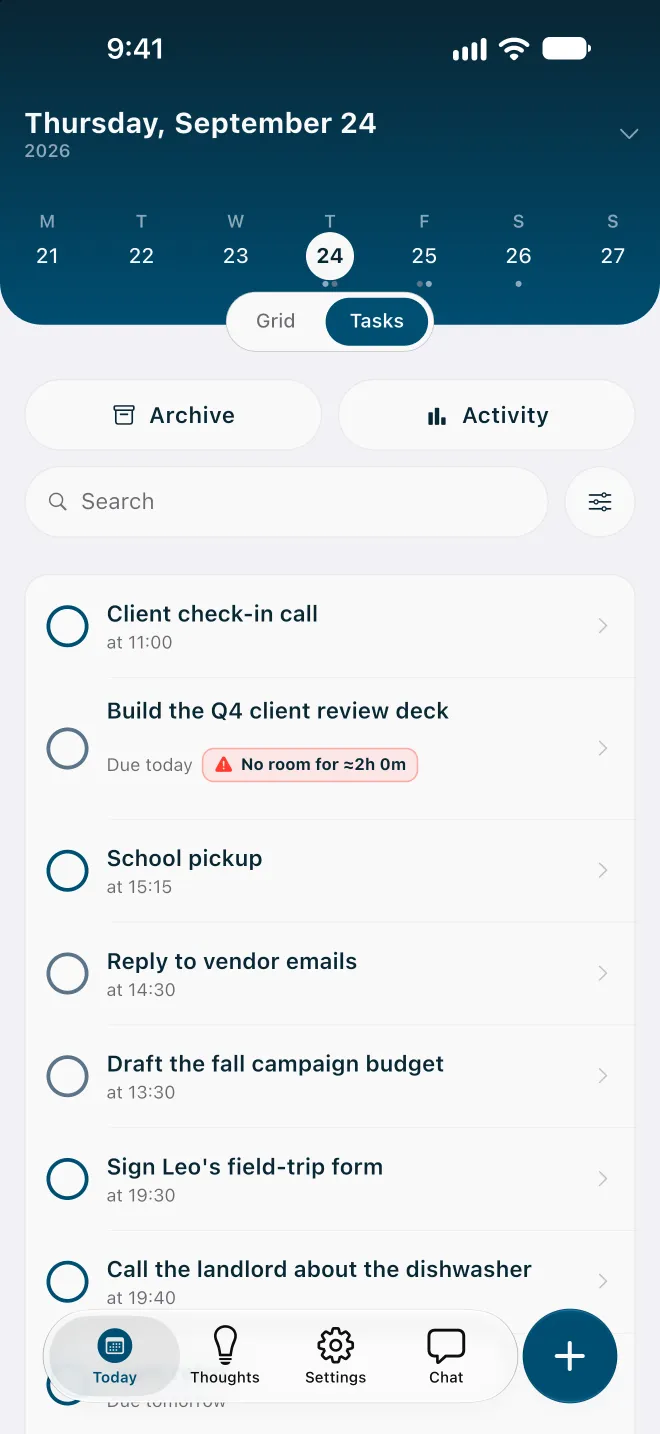
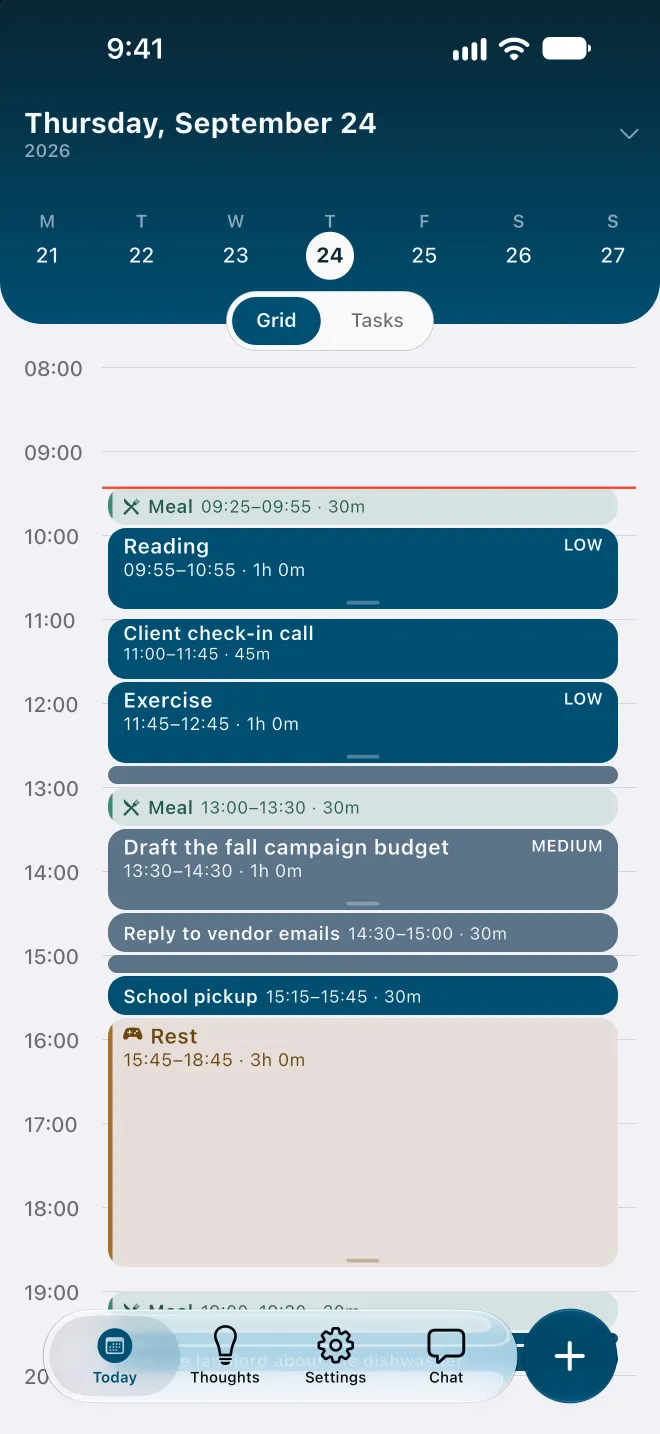
The whole day, including the parts outside work. You set sleep, meals and rest, and they are placed before any task. On an overfull day Flowo shortens rest first, then meals, and sleep last, never below the minimums you choose, and marks any task that relies on it with Uses recovery time.
A plain answer when the day is full. Each task comes back as on track, using recovery time, or No room with roughly how much time is missing. Tapping the badge opens a sheet that may offer to move the deadline or make room in other ways; what it can offer depends on the day, and nothing changes until you confirm.
Local-first and account-free. Flowo has no email login or account. Core planning records are kept in encrypted local storage on the phone. Flowo does not sell planning content or use it for advertising or model training.
Explanations you can read. Open any block and choose Why here? to see what decided its place and what the next best time was. The methodology page publishes the planner's limits, including the ones that can produce a worse plan.
Side by side
| Motion (from its pages, 23 Sep 2026) | Flowo | |
|---|---|---|
| Built for | Individuals and teams of all sizes | One person's day |
| How scheduling is described | AI Calendar and AI Task Manager, scheduling by deadlines, duration, priorities and dependencies | Deterministic rules on the phone; same inputs, same schedule |
| When there is too much to do | Flags over-scheduling and warns about at-risk tasks | Per-task status, with a No room badge and the missing time |
| Sleep, meals and rest | Not covered on the pages we read | Placed first; shortened only to your minimums |
| Team features | Business AI adds team capacity planning, Gantt charts and time tracking | None; Flowo does not schedule across people |
| Apps | iOS, Android and desktop apps (Pro AI) | iPhone and Android |
| Price for one person | Pro AI: $49 a month, or $29 a month billed annually | Free download; Pro US$7.99 a month, US$49.99 a year or US$89.99 once |
| Free trial | Offered; length not stated on the pricing page | 14 days on monthly and yearly Pro, with a payment method |
When Motion is likely the better fit
- You plan projects with other people and want shared tasks, dependencies and Gantt charts in the same tool.
- You want meeting scheduling, meeting notes and docs alongside your calendar.
- You work mostly at a desk and want a desktop app.
Flowo does none of these. It plans one person's day and does not coordinate a team calendar.
When Flowo may fit better
- Your day is more than work: school pickup, meals, rest and sleep need to be in the plan, and protected.
- You want to know early, in plain words, which task will not fit, and to decide what gives.
- You prefer a scheduler whose result you can reproduce and inspect, and planning data that stays on your phone.
- You want a lower price for personal use, or a one-time purchase.
Moving your day into Flowo
The simplest way to move over is by hand. It takes one sitting, and it doubles as a review of what you are carrying.
- Set your sleep, meal and working hours during setup, by answering a few question cards or describing your week.
- Add fixed events first: calls, classes, pickups. They do not move.
- Add the tasks that have deadlines, each with an honest duration.
- Put everything else in Thoughts, and turn notes into tasks when they need a time.
Then read the statuses. Any No room badge on day one tells you something useful about the list. See how Flowo re-plans for what to do with it.
Flowo is a planning tool. It is not a medical device, it does not diagnose or treat any condition, and there is no published evidence about its effect on ADHD or on any health outcome.
Flowo is free to download on the App Store for iPhone and on Google Play for Android. Flowo Pro is an optional in-app purchase: US$7.99 a month or US$49.99 a year, both starting with a 14-day free trial that needs a payment method, or US$89.99 once with no trial. Your store shows the local price before you confirm.
Questions
Is Flowo a good Motion alternative?
Flowo is an alternative to Motion for planning one person's day: both place tasks on a schedule and re-plan when things change. Motion also covers team projects, meetings and docs, which Flowo does not.
Does Flowo use AI to schedule tasks?
No. Flowo's routine scheduling is deterministic: it follows fixed rules on your phone and gives the same schedule for the same inputs. Optional cloud features run only when you use them.
How much does Motion cost compared with Flowo?
On 23 September 2026, Motion's pricing page listed Pro AI for one person at $49 a month, or $29 a month billed annually. Flowo is free to download, and Flowo Pro costs US$7.99 a month, US$49.99 a year or US$89.99 once.
Can Flowo schedule meetings for a team?
No. Flowo plans one person's day around the events and tasks that person enters, and it does not schedule meetings across people or manage a shared calendar.
Does Flowo need an account?
No. Flowo works without an email login or account, and core planning records stay in encrypted local storage on your phone.
Sources
- Motion home page, accessed 2026-09-23
- Motion pricing, accessed 2026-09-23
- Motion AI Calendar, accessed 2026-09-23
- Motion AI Task Manager, accessed 2026-09-23