 Flowo
Updated
The short version
- Goblin Tools describes itself on the App Store as "a collection of small, simple tools, for when things feel too big or complicated". Magic ToDo breaks a to-do item into steps, Estimator guesses how long an activity takes, and Compiler turns a brain dump into actions. The website is free, with no ads or paywalls.
- Flowo takes tasks with a duration and a deadline, places them around your fixed events, meals and sleep, and shows on one screen whether the day still fits. When a task runs over, Flowo rebuilds the rest of today on its own.
- The gap between them. Goblin Tools tells you what the steps are and roughly how long each one takes. It does not put them on a clock. Flowo decides when each step happens and what moves when the morning slips.
If the hard part is knowing where to start, Goblin Tools is the faster help, and on the web it costs nothing. If the hard part is a list that never fits into the day, the rest of this page shows how Flowo handles that moment.
When Goblin Tools is the better choice
For several needs, Goblin Tools is the stronger pick today. Each point below comes from its own website or its App Store listing.
- Free in any browser. The about page says the website is "offered free and available to all", with no ads or paywalls, and that features which are not considered advanced will stay free. Flowo has no web app.
- Breaking a task into steps. The home page describes Magic ToDo in four words: "Break down todo items". Flowo can suggest editable steps for a task when you ask, but breaking tasks down is the centre of Goblin Tools and a side feature in Flowo.
- Help with words as well as tasks. Formalizer changes the tone of a text, Judge reads a message for emotion, Professor explains a topic and Consultant helps with a decision. Taskmaster keeps you on one task at a time, and Chef makes a recipe from the ingredients you have. Flowo has none of these.
- More places to use it. The tools run in a browser, and the about page says there are apps for iOS and Android. The App Store listing covers iPhone, iPad, Mac and Apple Vision. Flowo runs on iPhone and Android only.
- A very small price. The US App Store lists the app at US$0.99 once, with an optional Goblin Tools Pro subscription at US$3.99 a month or US$39.99 a year. The listing shows a 4.8 average from about 3,100 ratings.
Where Flowo is different
Steps get a time, not only a place on a list. A task in Flowo carries a duration, a deadline and a priority. The planner places it in the free time before its deadline, around fixed events such as a school pickup or a call, and the Today grid draws it as a block whose height matches its length, with a red line at the current time.
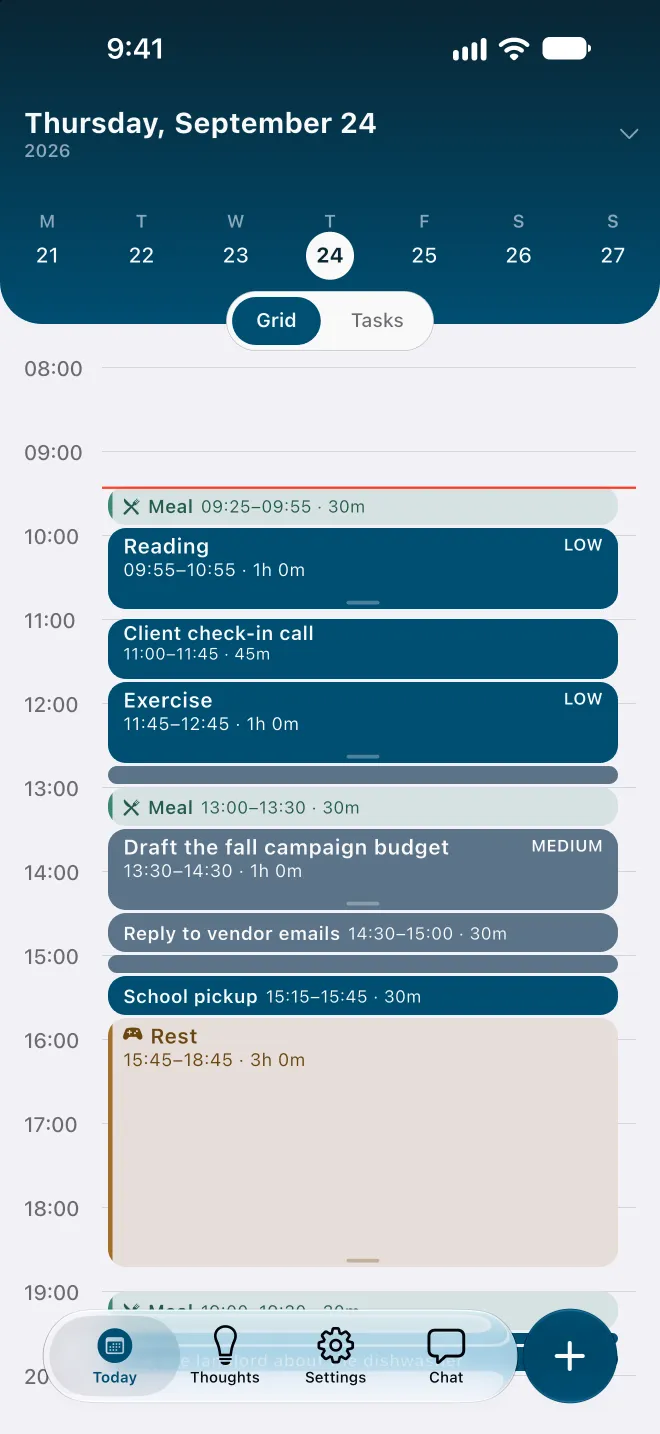
Flowo rebuilds the rest of the day. When a task runs over, Flowo runs the planner again on the hours that remain, without being asked. Fixed events and pinned blocks stay where they are, and the other tasks are placed again in order of deadline and priority. Flowo then shows what moved and why. Rebuilding the day is free. When a task can no longer make its deadline, Recovery shows the ways to still fit it; the free plan includes 7 of those fixes a week, and Flowo Pro removes the limit.
A plain answer when the list is too long. Estimator guesses how long one activity takes. Flowo adds up the whole day: a task that cannot fit before its deadline carries a No room badge with roughly how much time is missing, and the Resolve schedule sheet may offer to move the deadline. Nothing changes until you confirm.
Meals, rest and sleep come first. These blocks are placed before any task. On an overfull day Flowo shortens rest first, then meals, and sleep last, never below the minimums set in My Day, and labels any task that depends on it Uses recovery time.
Capture first, sort later. Brain Dump, in the Thoughts tab, keeps notes without a folder or a date, and a note becomes a task once it has a duration. Tidy Up groups related notes by theme, but only when you tap it, and the free plan includes 5 Tidy Up runs a week. The Brain Dump guide covers the details.
Fixed rules on the phone and no account. Routine scheduling in Flowo is deterministic: the same inputs give the same schedule, and no language model arranges the day. Flowo needs no email login or account, and core planning records stay in encrypted local storage on the device. The methodology page lists the rules and their limits.
Using both on the same day
The two apps fit together better than they compete. A morning with a task too vague to start might go like this.
- Type the vague item, such as "sort out the tax papers", into Magic ToDo and keep the three or four steps that matter.
- Run Estimator on any step you cannot size, and treat its answer as a first guess.
- Add each step to Flowo as a task with that duration and a deadline. Flowo places the steps in today or the coming days, around the fixed events already there.
- If one step takes twice as long as the guess, stretch its block. The rest of the day is rebuilt, and Flowo shows what moved.
Compiler works the same way for a long brain dump. It turns a page of text into actions, and each action can go into Flowo's Brain Dump as a note, then become a task once it needs a time.
The order matters. Breaking a task down tells you what to do. Placing it tells you when, and what has to give if the day is already full.
Side by side, as of November 2026
| Goblin Tools (its pages and App Store listing, 11 Nov 2026) | Flowo | |
|---|---|---|
| What it does | Small single-purpose tools: break down a task, estimate time, compile a brain dump, change tone, explain, decide and cook | Plans one person's day from tasks, fixed events, meals and sleep |
| Platforms | Web, plus apps listed for iPhone, iPad, Mac and Android | iPhone and Android |
| Price | Website free; app US$0.99 once in the US store; optional Pro at US$3.99 a month or US$39.99 a year | Free download; optional Flowo Pro at US$4.99 a month, US$29.00 a year or US$44.99 once |
| Places tasks on a schedule | No; its pages describe no calendar or time-of-day feature | Yes, from durations, deadlines and fixed events |
| When a task runs over | Not covered on its pages | Rebuilds the rest of today on its own and shows what moved |
| Too much for the time left | Estimator guesses one activity at a time | No room badge with roughly how much time is missing |
Trying Flowo
Flowo is free to download on the App Store for iPhone and on Google Play for Android. Flowo Pro is an optional in-app purchase: US$4.99 a month or US$29.00 a year, both starting with a 14-day free trial that needs a payment method, or US$44.99 once with no trial. Your store shows the local price before you confirm.
A good first test is the list you just broke down. Add the steps with their durations, enter the fixed events for today and look at the grid. A No room badge marks the place where the steps and the hours disagree.
The full mechanics are on the page about how Flowo re-plans when the day slips. The planner comparison covers Goblin Tools beside eight other apps, and a separate page compares Tiimo and Structured.
Questions
Is Flowo a Goblin Tools alternative?
Partly. Goblin Tools breaks a task into steps and estimates time, while Flowo places tasks in the day and rebuilds the rest of today when one runs over. Many people will use Goblin Tools to find the steps and Flowo to schedule them.
Is Goblin Tools free?
The website is free, with no ads or paywalls, according to its about page. The US App Store lists the app at US$0.99 once, and Goblin Tools Pro is an optional subscription at US$3.99 a month or US$39.99 a year.
Does Goblin Tools schedule tasks on a calendar?
Its home and about pages describe no scheduling or calendar feature. Estimator guesses how long an activity takes, but it does not place the activity at a time of day.
Can Flowo break a task into steps?
Flowo can suggest editable steps for a task when you ask for them. It is a small part of Flowo, and Magic ToDo in Goblin Tools does more of it.
Is there a free app that schedules the steps for me?
Flowo is free to download on iPhone and Android, and its free plan includes 7 Recovery fixes a week and unlimited Brain Dump notes. Flowo Pro is optional and starts with a 14-day free trial on the monthly and yearly plans.
Sources
- Goblin Tools home page, accessed 2026-11-11
- Goblin Tools about page, accessed 2026-11-11
- Goblin Tools on the App Store (US), accessed 2026-11-11