 Flowo
Updated
The short version
- Sunsama walks you through planning each day: pull in tasks from tools such as Asana, Jira, Notion and Todoist, decide how long each one gets, then drag them onto your calendar. Unfinished tasks roll over to the next day at midnight. It costs US$22 a month, or US$17 a month billed yearly, after a 14-day trial that needs no card.
- Flowo takes tasks with durations and deadlines, places them around fixed events, meals and sleep, and rebuilds the rest of today when something runs long. It runs on iPhone and Android, is free to download, and Flowo Pro costs US$4.99 a month or US$29.00 a year.
- The difference in one line. Sunsama helps you decide the day in a calm morning routine and moves leftovers to tomorrow. Flowo recalculates today at 10:40, when the morning plan has already broken.
When Sunsama is the better choice
For many working setups, Sunsama is the stronger pick today. Each point below comes from Sunsama's own pages.
- Work spread across many tools. The daily planning page lists Asana, ClickUp, GitHub, Jira, Linear, Monday, Notion, Todoist and Trello, plus Gmail and Outlook email and Slack and Microsoft Teams. Flowo connects to none of them.
- Calendar sync. Sunsama says it "bi-directionally syncs" with Google, Outlook and iCloud calendars. Flowo does not import other calendars today, so events are added in Flowo.
- A computer as the main screen. The pricing page lists apps for iOS and iPadOS, Android, macOS, Windows and Linux. Flowo has no desktop or web app.
- A planning routine. Sunsama describes "guided daily planning" as a step-by-step routine, with realistic daily goals so the workday ends at a reasonable time. People who like to choose each block deliberately get that structure built in.
- Teams. Sunsama bills per person in a shared workspace and offers an Enterprise plan for larger companies. Flowo plans one person's day.
Where Flowo is different
The planner places the work. Sunsama's timeboxing page says to "drag the task to the desired time slot". In Flowo a task goes in with a duration, a deadline and a priority, and the planner finds its place in the free time before the deadline. Why here? on any block shows what decided it.
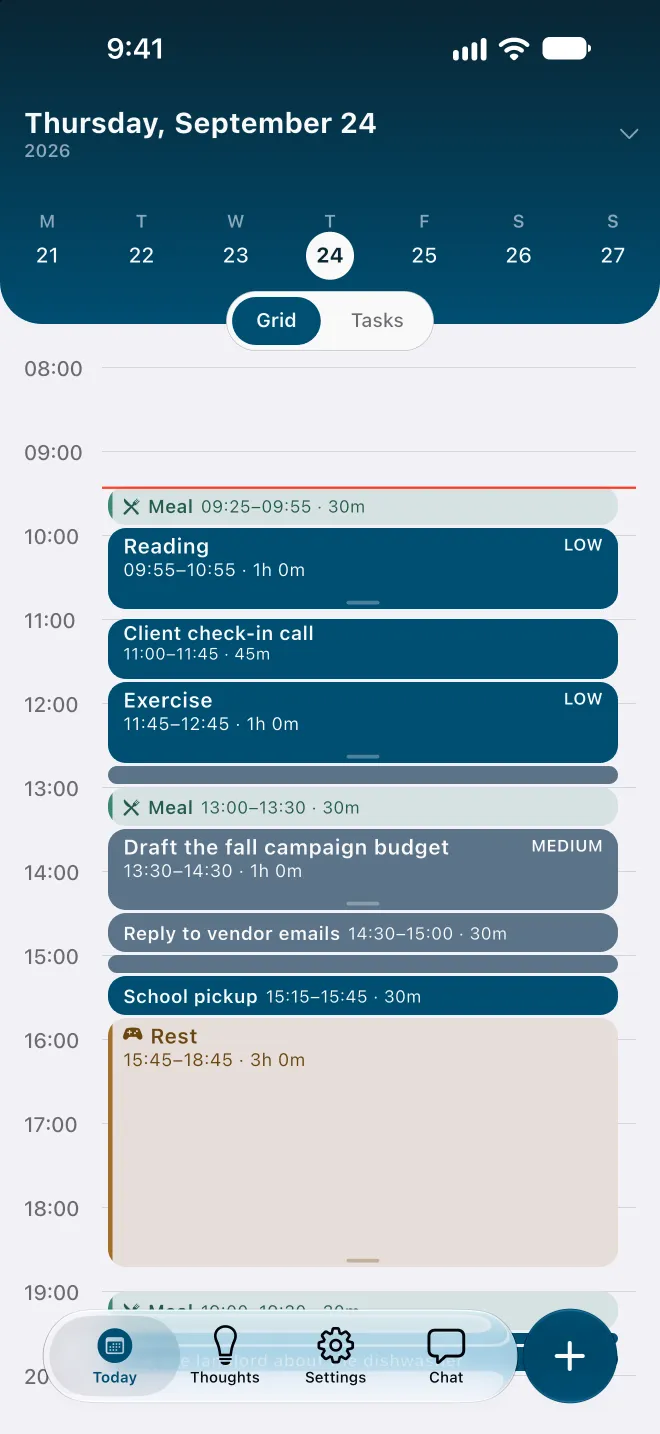
Re-planning inside today. Sunsama's help centre says tasks "automatically roll over to the next day's task list if they are left incomplete at midnight". Flowo works on the hours that are left. When a task runs over, it runs the planner again from now, on its own: fixed events and pinned blocks stay put, and every other task is placed again in order of deadline and priority. Rebuilding the day is free, and the free plan includes 7 Recovery fixes a week for tasks that can no longer make their deadline.
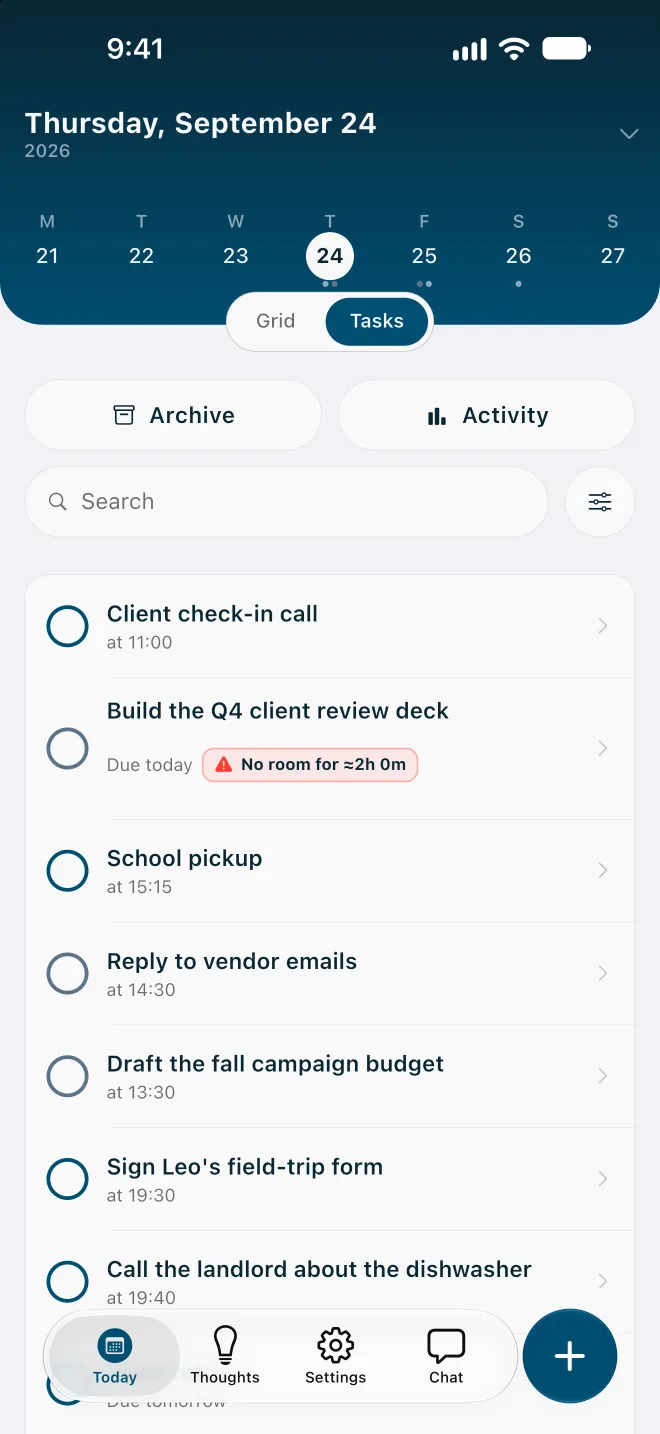
A warning before the day overflows. Sunsama's Task Projections give a preview of how today's tasks fill the time you have. Flowo makes the same check for every task with a deadline: one that cannot fit carries a No room badge with roughly how much time is missing, and the Resolve schedule sheet may offer to move the deadline. Nothing changes until you confirm.
Meals, rest and sleep are part of the plan. They are placed before any task, and on an overfull day Flowo shortens rest first, then meals, and sleep last, never below the minimums set in My Day.
A free version and a lower price. Sunsama's pricing page says it "doesn't have a free forever plan and doesn't plan to". Flowo is free to download, with weekly limits on Recovery and Tidy Up, and Flowo Pro costs less than a quarter of Sunsama's monthly price.
No account. Flowo needs no email login, and core planning records stay in encrypted local storage on the phone. Routine scheduling follows fixed rules on the device, so the same inputs give the same schedule.
One afternoon in each app
Take an afternoon where a 13:00 task planned for an hour is still open at 14:15. A call is fixed at 15:30, and a report is due at 17:00.
In Sunsama, the day sits on your calendar as timeboxes you placed in the morning. Its timeboxing page says a task you lock "stays locked in place, with the rest of your tasks auto-adjusted to flow around it", and whatever is still open at midnight rolls over to tomorrow.
In Flowo, stretching the task by 15 minutes runs the planner again on the rest of the afternoon around the 15:30 call. If the report no longer fits before 17:00, it carries a No room badge with the missing time. The problem shows at 14:15 rather than at the end of the day, while there is still time to move the deadline or drop something smaller.
Side by side, as of November 2026
| Sunsama (its pages, 11 Nov 2026) | Flowo | |
|---|---|---|
| Platforms | iOS and iPadOS, Android, macOS, Windows and Linux | iPhone and Android |
| Free version | None; 14-day trial with no credit card | Free download with 7 Recovery fixes and 5 Tidy Up runs a week; notes have no limit |
| Price | US$22 a month, or US$17 a month billed yearly (US$204 a year) | Flowo Pro at US$4.99 a month, US$29.00 a year or US$44.99 once |
| How tasks get a time | You drag each task to a time slot on your calendar | The planner places tasks from durations, deadlines and fixed events |
| Unfinished work | Rolls over to the next day at midnight | Rebuilds the rest of today on its own and shows what moved |
| Connections | Google, Outlook and iCloud calendars, task tools, email and chat | None; events and tasks are added in Flowo |
| Shared use | Per-person workspaces and an Enterprise plan | One person's day |
Who should pick which
Sunsama suits a working day planned at a desk, with tasks arriving from several tools and a calendar that other people book into. Flowo suits a day that lives on a phone and changes after it is planned, where the useful answer at two in the afternoon is what still fits before five and what has to move.
Flowo is free to download on the App Store for iPhone and on Google Play for Android. Flowo Pro is an optional in-app purchase: US$4.99 a month or US$29.00 a year, both starting with a 14-day free trial that needs a payment method, or US$44.99 once with no trial. Your store shows the local price before you confirm.
The full mechanics are on the page about how Flowo re-plans when the day slips. A matching page compares Flowo with Motion, another planner built around a work calendar.
Questions
Is Flowo a Sunsama alternative?
Yes, for planning one person's day on iPhone or Android when the plan changes during the day. Sunsama fits better when work is planned on a computer across many tools and calendars.
Is there a free alternative to Sunsama?
Sunsama has no free plan, and its pricing page says it does not plan to add one. Flowo is free to download, and its free plan includes 7 Recovery fixes a week and unlimited Brain Dump notes.
How much does Sunsama cost?
Sunsama's pricing page lists US$22 a month billed monthly, or US$17 a month billed yearly, which is US$204 a year. There is a 14-day trial with no credit card.
Does Sunsama reschedule tasks automatically?
Sunsama's help centre says unfinished tasks roll over to the next day's list at midnight with no action needed. Placing a task on the calendar is done by dragging it to a time slot.
Does Flowo sync with Google Calendar or Outlook?
Not today. Events are added in Flowo, and the planner places tasks around them.
Sources
- Sunsama pricing, accessed 2026-11-11
- Sunsama daily planning, accessed 2026-11-11
- Sunsama timeboxing, accessed 2026-11-11
- Sunsama help: task rollover, accessed 2026-11-11