Braindump
A braindump app: capture first, sort later
When your head is full, deciding where a thought belongs is one decision too many. Flowo's Thoughts screen takes a note without asking for a folder, a date or a priority. You sort later, when you have room for it, and turn the notes that matter into tasks the planner can place.
Updated
Why capturing and sorting are separate steps
A thought usually arrives at a bad time: in the middle of a call, on the way out the door, at 11 p.m. Most apps ask you to decide something before they will save it. Which list? Which project? What date? Each question is small, and together they are enough to make you keep the thought in your head "for now".
A braindump removes those questions. You write the thought down as it is, in one place, and stop holding it. Sorting becomes a separate job you do later, in one sitting, with the whole pile in front of you. That is also when it is easiest to see which notes are tasks, which are ideas, and which you can delete.
Flowo is built around that split. Capture is fast and asks nothing. Sorting is optional, and the tools that help with it run only when you ask for them.
The Thoughts screen
Thoughts is one of the four tabs at the bottom of the app. Tap the plus button and type. There is no folder to pick and no required field. Each note becomes a card, and a counter at the top shows how many you have.
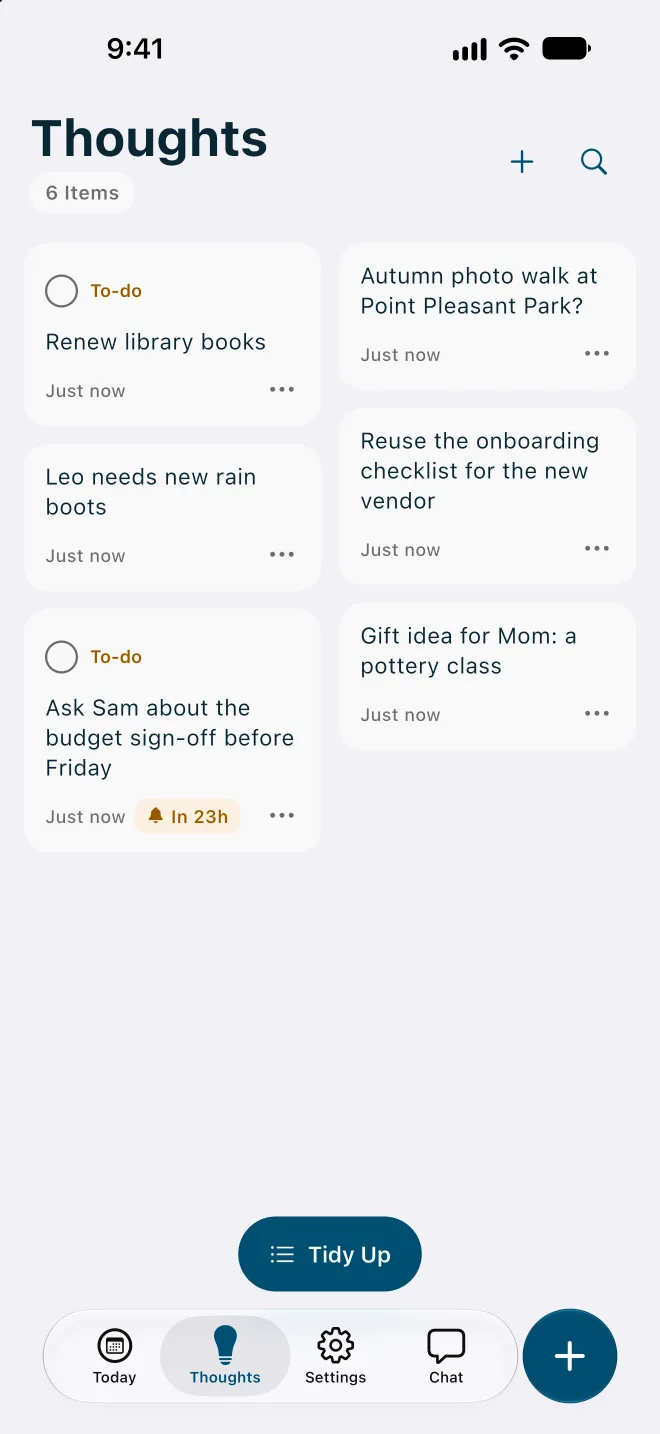
Flowo reads the text for two things as you save it:
- To-dos. A note that reads like something to do, such as "Renew library books", gets a To-do label and a checkbox.
- Times. A note that mentions a time, such as "before Friday" or "meeting at 5pm", can get a reminder automatically. In the example above, "Ask Sam about the budget sign-off before Friday" shows a reminder chip reading "In 23h".
This detection currently works best with English phrasing. Notes that it does not recognise are still saved exactly as you wrote them. You can also speak a note instead of typing it; voice notes use a cloud feature and have a daily limit.
Turning a note into a task
A note stays a note until you decide otherwise. Open the menu on a card (the three dots) to change what it is:
- Convert to Task turns the note into a planner task. Give it a duration and, if it has one, a deadline, and the planner finds it a place in your day around your fixed events, meals and rest.
- Convert to TO-DO marks a note as something to do without scheduling it.
- Convert to Note turns a to-do back into a plain note, if it turns out to be an idea.
Once a note is a task, it follows the same rules as every other task. If it cannot fit before its deadline, it gets a No room badge showing roughly how much time is missing, so a promise you wrote down in a hurry does not quietly overfill tomorrow. How Flowo re-plans explains what happens next.
Tidy Up runs only when you tap it
After a busy week, Thoughts can hold dozens of notes. Tidy Up is a button at the bottom of the screen that groups related notes so they are easier to review. Nothing is grouped until you tap it.
- When you tap Tidy Up, Flowo sends the notes it is grouping to its cloud service over an encrypted connection, and groups them by theme.
- If the cloud service cannot be reached, Flowo falls back to simple rule-based grouping on the phone, such as separating tasks from notes.
- Grouping changes how notes are arranged on the screen. Turning a note into a task is still your choice.
- On the free plan, Tidy Up runs up to 5 times a week. Writing notes has no limit.
If you would rather keep every note on the phone, type your notes and leave Tidy Up alone. Capturing, reading, searching and converting notes all work without it.
A five-minute sort that keeps the pile small
A braindump only helps if the pile gets looked at. A short, regular sort is usually enough. Here is one way to do it, once a day or a few times a week:
- Scan the newest cards first. Delete anything that no longer matters. Deleting is sorting too.
- For each note with a deadline, convert it to a task and give it an honest duration. Let the planner say whether it fits.
- Leave ideas as notes. They do not need a date to be worth keeping.
- If the pile is large, tap Tidy Up first and sort group by group.
Nothing counts against you if you skip a week. The notes are still there when you come back.
Where your notes live
Notes are stored in encrypted local storage on your phone, and Flowo does not need an email login or account. Search in Thoughts runs on the device. A note leaves the phone only when you use a disclosed cloud feature, such as Tidy Up or a voice note. Flowo does not sell planning content or use it for advertising or model training. The Privacy Policy names the services involved.
For the planning side of Flowo, read how the day is shown as blocks. If you are comparing planners, see Flowo and Motion compared, or the Journal note on capturing thoughts and turning them into tasks.
Flowo is a planning tool. It is not a medical device, it does not diagnose or treat any condition, and there is no published evidence about its effect on ADHD or on any health outcome.
Flowo is free to download on the App Store for iPhone and on Google Play for Android. Flowo Pro is an optional in-app purchase: US$7.99 a month or US$49.99 a year, both starting with a 14-day free trial that needs a payment method, or US$89.99 once with no trial. Your store shows the local price before you confirm.
Questions
What is a braindump app?
A braindump app is a place to write down everything on your mind quickly, without organising it first. In Flowo, that place is the Thoughts screen, and sorting happens later, when you choose.
Do I have to choose a folder or category for each note?
No. A note in Flowo needs only its text. There is no folder, date or priority to pick when you save it.
How do I turn a note into a task?
Open the note's menu and choose Convert to Task, then give it a duration and, if it has one, a deadline. The planner then places it in your day around fixed events, meals and rest.
Does Tidy Up send my notes to the cloud?
Yes, when you tap Tidy Up and the cloud service is available, the notes being grouped are sent to Flowo's cloud service over an encrypted connection. If it is unavailable, Flowo groups notes with simple rules on the phone, and if you never tap Tidy Up, your notes stay on the device.
Can Flowo remind me about something I wrote down?
Yes. When a note mentions a time, such as "before Friday" or "at 5pm", Flowo can set a reminder for it automatically. This detection works best with English phrasing today.
Is the braindump free?
Yes. Writing notes in Flowo is free and has no limit. Tidy Up runs up to 5 times a week on the free plan, and Flowo Pro, which is optional, lifts that weekly limit.