Updated
The short answer
- They hold what your head would otherwise carry. Your tasks and their times live on the screen. Psychologists call the habit behind this cognitive offloading: using a physical action, such as setting a reminder, to lower the mental load of a task (Risko and Gilbert, 2016).
- Some also make decisions for you, such as where a task goes in the day and what moves when something runs over. Apps differ most in how much of this they take on.
- None of them has trial evidence yet. A systematic review of 109 apps marketed for ADHD found none that reported evidence of efficacy (Păsărelu et al., 2020). Flowo has not been tested in a trial either, and this page says so plainly.
If you are choosing one, start from the part of the day that keeps going wrong for you. The table further down matches common sticking points to the kind of tool built for each, with examples checked on their own websites.
What executive functions are
Adele Diamond's review in the Annual Review of Psychology describes three core executive functions and treats planning as a higher skill built on top of them (Diamond, 2013).
- Working memory keeps information in mind while you use it, such as the time of the next meeting while you finish an email.
- Inhibitory control holds back a first impulse, such as opening a message that has just arrived.
- Cognitive flexibility lets you switch approach when the first one stops working, such as rebuilding the afternoon after a call runs long.
A study of 137 university students found these skills related to each other but clearly separable (Miyake et al., 2000). In everyday terms, a person can find one of them hard and another easy, which is one reason a single app rarely suits everyone.
A meta-analysis of 83 studies found executive-function difficulties more often, on average, in groups with ADHD. It also found that these difficulties do not appear in every person with ADHD and do not explain ADHD on their own (Willcutt et al., 2005). Finding planning hard is common, and it is not a diagnosis. Diamond's review also notes that stress and lack of sleep make these skills harder for anyone.
What a support app can take over
Each kind of support below rests on research about the habit, and none of these studies tested an app. They explain why a tool might help, and they leave open whether a particular tool does.
- Remembering. A list or a reminder holds what working memory would otherwise carry. It is the oldest and best-studied kind of offloading (Risko and Gilbert, 2016).
- Deciding when. Deciding in advance when, where and how you will act makes people more likely to follow through. A meta-analysis of 94 tests found a medium-to-large effect for plans that people formed themselves (Gollwitzer and Sheeran, 2006). The result is about the plan a person makes, and it does not show that a schedule made by software has the same effect.
- Estimating time. Most people underestimate how long their own tasks will take, and they estimate better when they think about how long similar tasks took before (Buehler et al., 1994). An app that keeps real durations in view gives you that comparison every day.
- Breaking a task down. A task with no obvious first step is hard to begin. Goblin.tools and Tiimo use AI to suggest steps, and Flowo can propose editable steps when you ask it to.
- Re-planning. When one task runs over, later parts of the day may need to move. Some apps move unfinished tasks to the next day, some offer a replan button, and a few rebuild the rest of the day.
Where apps stop
An app can hold a plan and move it. It cannot decide what matters to you, and it cannot do the work. Four limits are worth knowing before you pay for one.
- No trial evidence. The 2020 review of 109 ADHD apps found none reporting evidence that they work (Păsărelu et al., 2020). We found no controlled trial results on the official pages of the apps named on this page, and Flowo has none. Be careful with any app that promises clinical results.
- Skills are taught by people. Planning and time-management skills can be taught in structured programmes led by trained clinicians (Solanto et al., 2010). An app can be a place to practise them. It does not replace professional help.
- Research on time is narrow. Studies of time perception in ADHD mostly involve children and intervals of a few seconds (Zheng et al., 2022; Marx et al., 2022), and studies in adults are scarce and mixed (Mette, 2023). Be wary of an app whose whole pitch rests on one finding.
- Setup has a cost. Every planner needs your tasks, durations and fixed events before it can help. If entering them takes longer than the planning it saves, the app will not last a week.
Matching the tool to the sticking point
Examples come from each company's own pages, checked on 15 October 2026. The planner apps comparison covers prices and platforms for each one.
| If this keeps going wrong | Kind of tool | Examples |
|---|---|---|
| Starting a big task | Task breakdown | Goblin.tools Magic ToDo, free on the web; Tiimo's AI co-planner; Flowo's task breakdown, on request |
| Remembering what is due | Lists and reminders | Todoist and TickTick, both with free plans |
| Seeing the shape of the day | Visual timeline | Structured and Tiimo timelines; the Flowo Today grid |
| The plan breaking by late morning | Re-planning | Motion re-plans automatically; Structured has a Replan button on Apple devices; Flowo's Recovery rebuilds the rest of today |
| Work spread across calendars and desktops | Calendar-centred planner | Motion, Sunsama and Amazing Marvin, which sync with Google and Outlook calendars |
Where Flowo fits
Flowo is software for neurodivergent people that automates daily planning and provides support when plans change. It runs on iPhone and Android, and it is built mainly for the fourth row of the table: the plan that breaks by late morning.
It places the work. You give each task a duration and a deadline, and add fixed events, meals and sleep. The scheduler places tasks in the time that remains by fixed rules on the phone, so the same inputs give the same schedule, and no language model arranges the day.
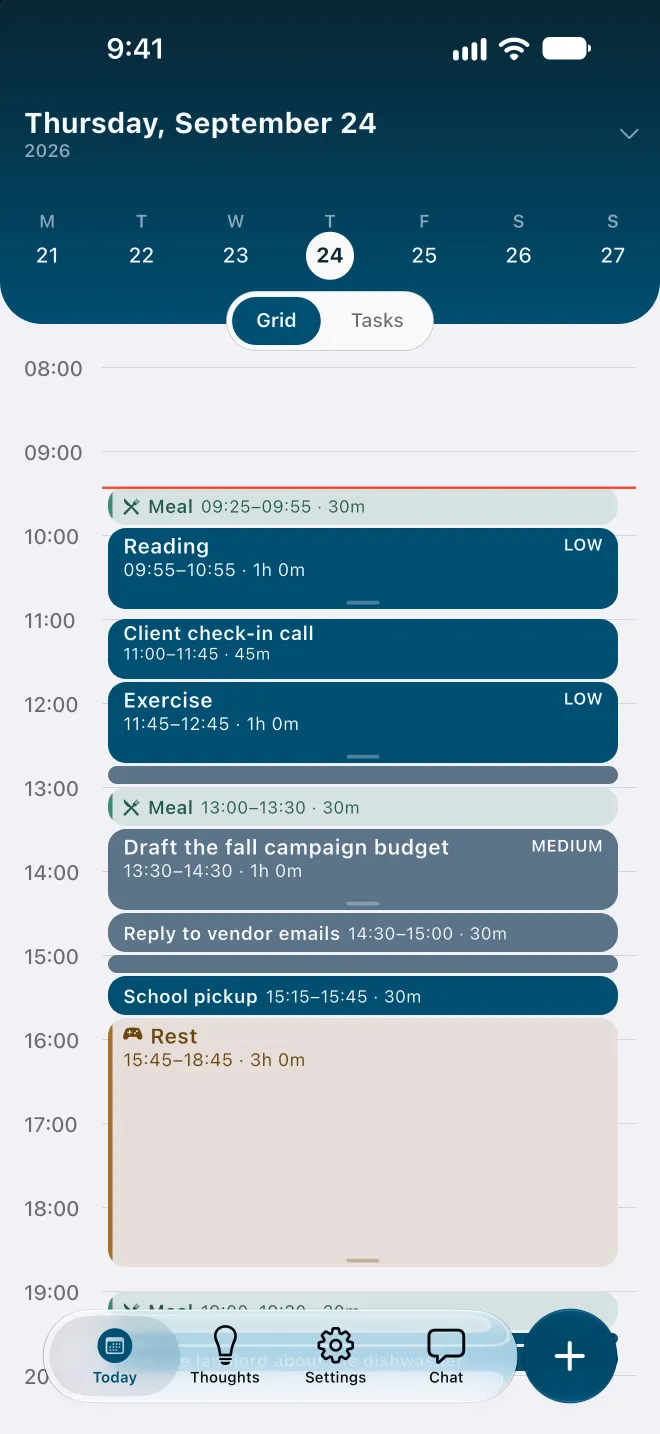
It rebuilds the rest of the day. When a task runs over, Recovery runs the planner again on the hours that remain. Fixed events stay where they are, the other tasks are placed again by deadline and priority, and Flowo shows what moved. The free plan includes 7 Recovery runs a week; Flowo Pro removes the limit.
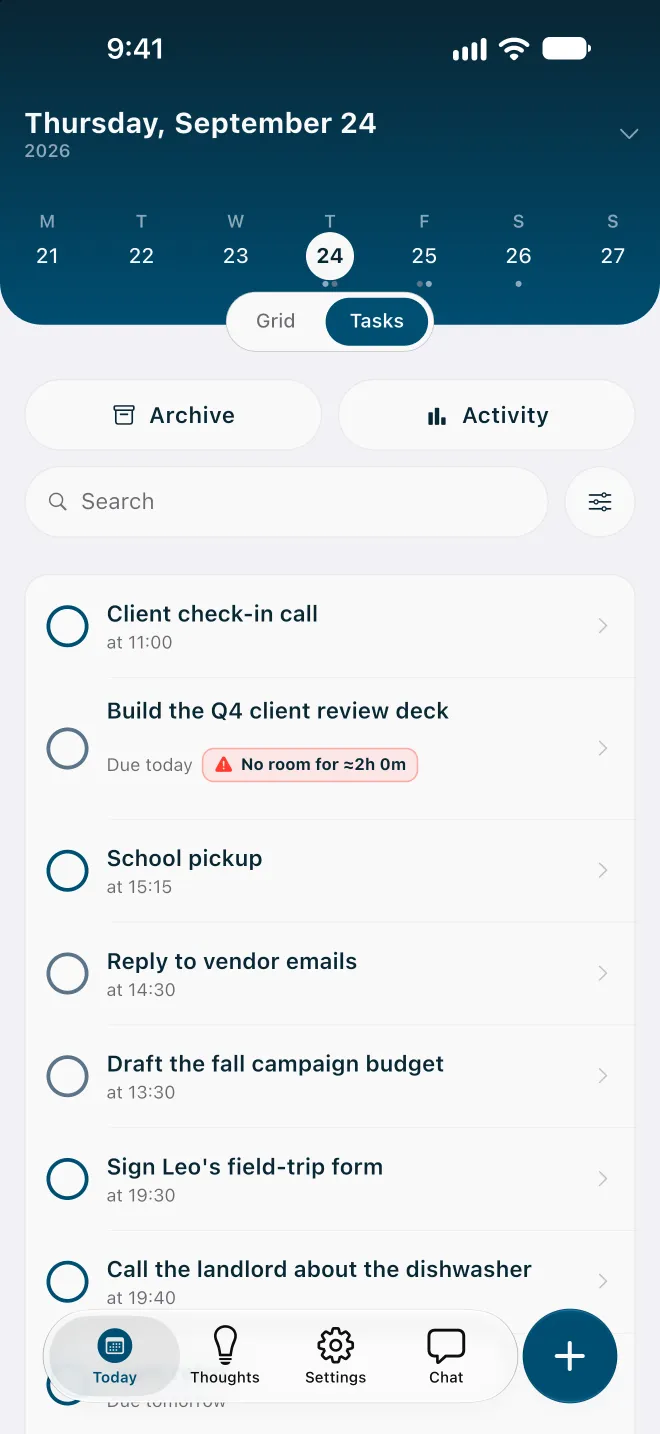
It says early when something will not fit. A task that cannot fit before its deadline carries a No room badge with roughly how much time is missing. Tapping the badge opens a sheet that may offer to move the deadline or make room in other ways, and nothing changes until you confirm.
It holds loose thoughts. Brain Dump, in the Thoughts tab, saves a note without a folder or a date. A note becomes a task once it has a duration, and the planner then finds it a place. The Brain Dump guide covers the details.
What it does not do. Flowo has no Mac, Windows, Apple Watch or web app today, and it does not import other calendars, so events are added in Flowo. It plans one person's day. For team projects or calendar sync, Motion, Sunsama or Amazing Marvin will suit you better.
Trying Flowo
Flowo is free to download on the App Store for iPhone and on Google Play for Android. Flowo Pro is an optional in-app purchase: US$7.99 a month or US$49.99 a year, both starting with a 14-day free trial that needs a payment method, or US$89.99 once with no trial. Your store shows the local price before you confirm.
A fair test takes one ordinary week. Add sleep, meals and working hours first, then the fixed events, then the tasks that have deadlines, each with a realistic duration. When the first day slips, run Recovery and look at what moved.
The mechanics are on the page about how Flowo re-plans when the day slips, and the methodology page lists the planner's rules and limits.
Questions
What is an executive-function support app?
It is an app that holds part of the planning work a person would otherwise do in their head, such as remembering tasks or adjusting the plan when the day changes. Research calls the general habit cognitive offloading.
Can an app replace professional help with planning?
No. Trained clinicians teach planning and time-management skills in structured programmes, and an app can be a place to practise them. Flowo is not a medical product and does not diagnose anything.
Is there a free executive-function app?
Several have free options. Goblin.tools is free on the web, Todoist and TickTick have free plans, and Flowo is free to download with 7 Recovery runs and 5 Tidy Up runs a week.
Do I need an ADHD diagnosis to use one?
No. Planning difficulties are common, and these apps are for anyone whose days keep slipping. Flowo was designed with ADHD in mind and needs no diagnosis to use.
Do executive-function apps work?
No app named here reports a controlled trial, Flowo included. The research supports some of the habits these apps build on, such as writing plans down and deciding when to act, and it does not yet show which apps help.
What should I check before paying for one?
Check that it addresses the part of the day that keeps going wrong for you and that it runs on your devices. Then use the free plan or trial for a week of real days before paying.
Sources
- Diamond, A. (2013). Executive functions. Annual Review of Psychology, 64, 135–168, accessed 2026-10-15
- Miyake, A., et al. (2000). The unity and diversity of executive functions. Cognitive Psychology, 41, 49–100, accessed 2026-10-15
- Willcutt, E. G., et al. (2005). Validity of the executive function theory of ADHD: A meta-analytic review. Biological Psychiatry, 57, 1336–1346, accessed 2026-10-15
- Risko, E. F., & Gilbert, S. J. (2016). Cognitive offloading. Trends in Cognitive Sciences, 20, 676–688, accessed 2026-10-15
- Gollwitzer, P. M., & Sheeran, P. (2006). Implementation intentions and goal achievement: A meta-analysis. Advances in Experimental Social Psychology, 38, 69–119, accessed 2026-10-15
- Buehler, R., Griffin, D., & Ross, M. (1994). Exploring the "planning fallacy". Journal of Personality and Social Psychology, 67, 366–381, accessed 2026-10-15
- Zheng, Q., et al. (2022). Time perception deficits in children and adolescents with ADHD: A meta-analysis. Journal of Attention Disorders, 26, 267–281, accessed 2026-10-15
- Marx, I., et al. (2022). Meta-analysis: Altered perceptual timing abilities in ADHD. JAACAP, 61, 866–880, accessed 2026-10-15
- Mette, C. (2023). Time perception in adult ADHD: Findings from a decade. IJERPH, 20, 3098, accessed 2026-10-15
- Solanto, M. V., et al. (2010). Efficacy of meta-cognitive therapy for adult ADHD. American Journal of Psychiatry, 167, 958–968, accessed 2026-10-15
- Păsărelu, C. R., Andersson, G., & Dobrean, A. (2020). ADHD mobile apps: A systematic review. International Journal of Medical Informatics, 138, 104133, accessed 2026-10-15
- Goblin.tools, accessed 2026-10-15
- Tiimo AI planning, accessed 2026-10-15
- Structured help: Replan, accessed 2026-10-15
- Motion home page, accessed 2026-10-15