ADHD day planner
A day planner that re-plans when the day slips
A plan made at 8 a.m. is often out of date by 10. Flowo is a day planner for iPhone and Android that rebuilds the rest of the day from the constraints you gave it, tells you which tasks no longer fit, and leaves the final call with you.
Updated
Why a plan that cannot bend stops getting used
Most planners ask you to arrange the day once and then hold you to it. That works until the first call runs long. After that, every block below it is wrong, and fixing the plan means doing the whole arranging job again, by hand, at the moment you have the least time for it.
This is a common point to give up on a planner, including for people who describe themselves as having ADHD. The plan starts to read as a record of what went wrong, and it stops being a guide to what is next.
Flowo takes a different job for itself. You describe the day once, as a set of constraints: what has to happen, how long it takes, when it is due, and what is fixed. The arranging is Flowo's part, and it does it again whenever those inputs change.
What you give Flowo
The planner only works with what you tell it. It does not read your email or guess at plans you have not entered.
- Tasks with an estimated duration, a deadline and a priority. "Draft the fall budget, 1 hour, due today, medium."
- Fixed events that do not move, such as a client call at 11:00 or school pickup at 15:15.
- Habits with a rhythm, such as exercise three times a week or reading before bed.
- Daily boundaries: when you sleep, when you eat, how much rest you want, and your working hours.
- Category windows, for example "work only between 9:00 and 17:30", and the hours you find most productive.
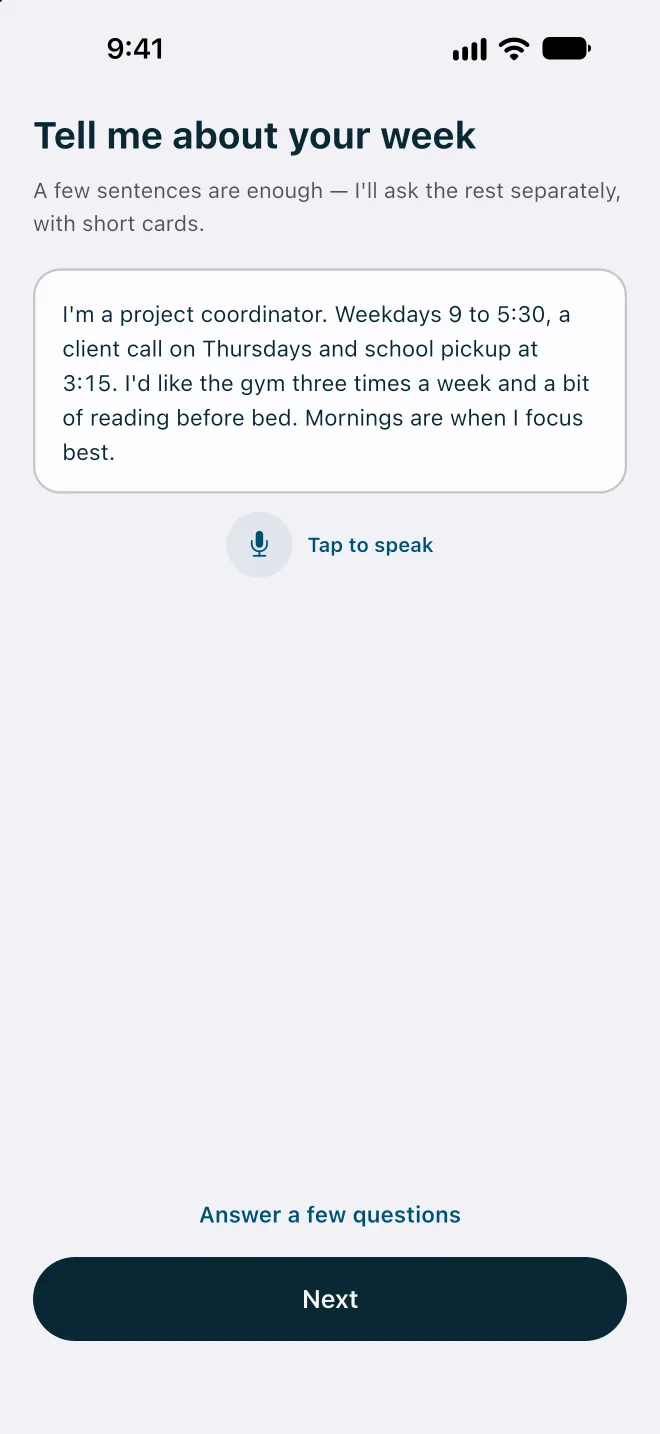
You can set this up in two ways. You can describe your week in a few sentences, which Flowo sends to its cloud service after asking for your consent, and it turns the description into a draft for you to review. Or you can tap Answer a few questions and fill in short cards, which stays on the phone.
How a re-plan works
Flowo's routine scheduling is deterministic. The planner runs on your phone and follows fixed rules, so the same inputs always produce the same schedule. It does not use a language model to arrange your day, and it does not add randomness. When two tasks tie, ordering rules decide, which is why a plan can be reproduced and explained.
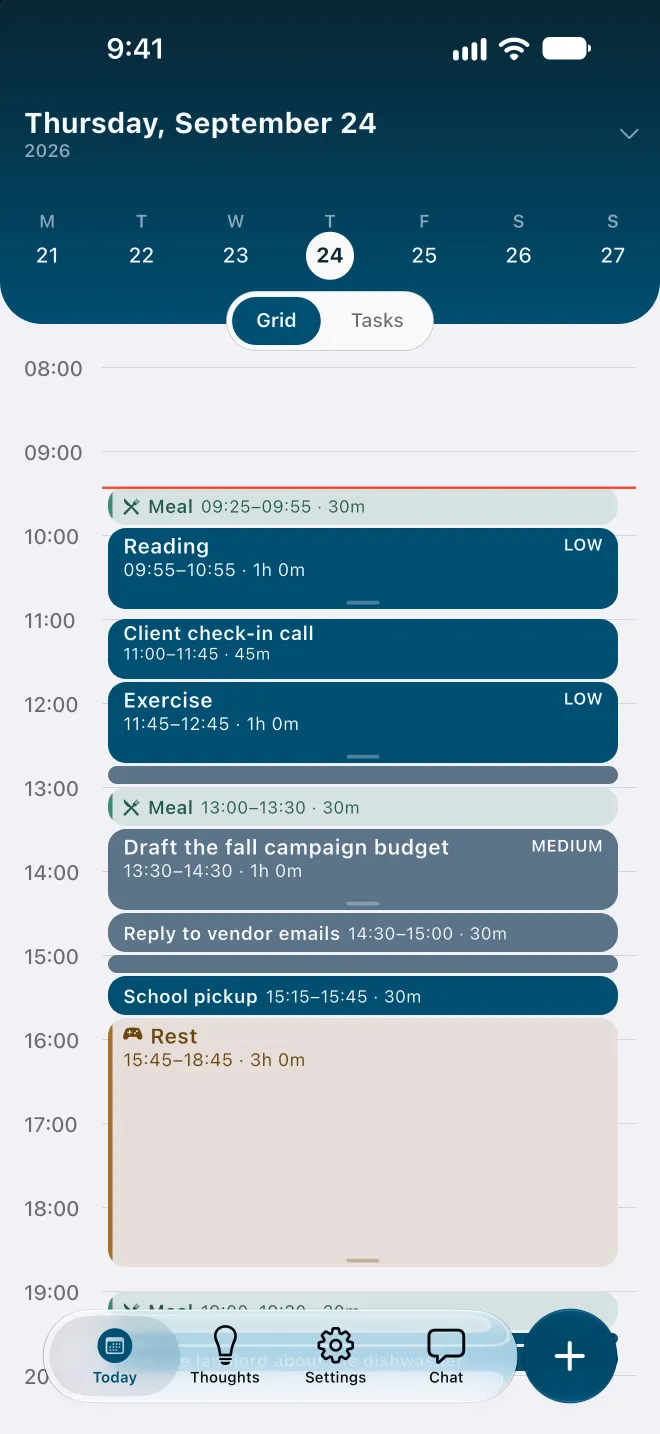
Sleep, meals, rest and fixed events are in the plan first. Tasks then go into the free time that is left before each deadline, in order of deadline and priority. When you add a task, change a duration, move an event or ask Flowo to rebuild the rest of the day, the planner runs again on the time that remains.
We publish the limits of this approach, because they affect what you see. Placement is greedy: tasks are sorted once and placed in order, and an early placement is not undone later in the same run, so a better arrangement can occasionally be missed. A recurring block is placed whole, so a 60-minute habit will not be split across two 30-minute gaps. The full list is on the methodology page.
Three answers for every task
After each run, every task comes back with one of three statuses. This is the part of Flowo most people find useful when the day has slipped, because it tells you where you stand without making you add up the hours yourself.
- Plan on track. The task fits before its deadline at your normal daily rhythm.
- Uses recovery time. The task fits only by shortening rest, meals or sleep. Flowo shortens rest first, then meals, and sleep last, and never below the minimums you set.
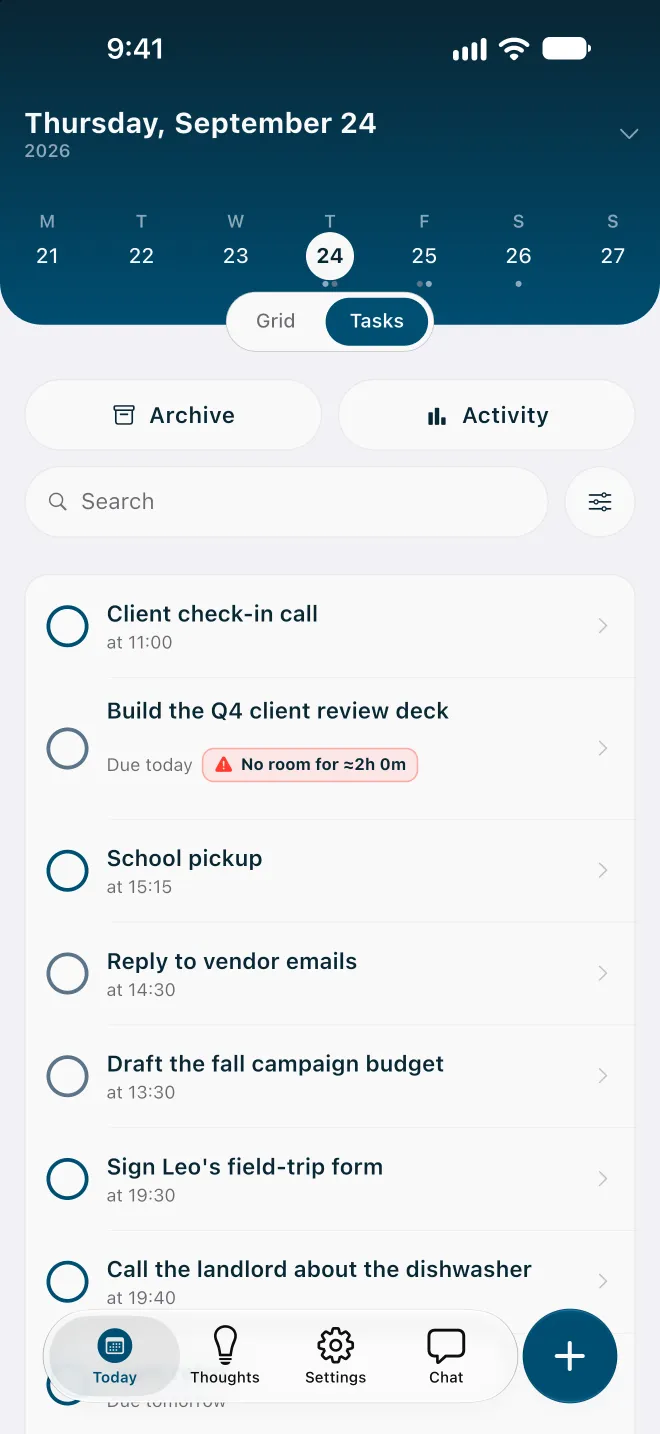
- No room for ≈ a duration. The task does not fit before its deadline even after that. The number is roughly how much time is missing.
In the example below, a two-hour deck is due at noon, but a client call sits at 11:00 and the morning is already committed. Flowo does not leave you to find that out at noon. It marks it No room for ≈2h 0m, so you find out at 9:30 instead of at 11:59.
When a task has no room
Tap the No room badge and Flowo opens a sheet called Resolve schedule. It shows "Checking safe options" while the planner works through the alternatives it can try for that task. Depending on the day, it may offer some of these:
- Protect the deadline, by shortening sleep, meals or rest. This is only offered if you allowed shortening in My Day.
- Move the deadline to a date where the task fits.
- Balance both: use some recovery time and move the deadline a shorter distance.
- Release a pinned slot you had fixed in place, or work outside category hours for this task.
- Leave as is, if you would rather handle it yourself.
An option only appears when the planner can work it through without breaking another commitment, so on a crowded day you may see only one or two, such as moving the deadline or leaving the task as it is. Sometimes the sheet cannot prepare any safe option, and it says so plainly. Nothing in this sheet is applied until you choose an option and confirm it.
Rebuilding the rest of the day in one tap is called Recovery in the app. The free plan includes 7 Recovery runs a week; Flowo Pro removes the weekly limit.
You stay in control of the plan
For routine changes, Flowo applies the new plan and then shows you what it did. There is no separate preview step before an everyday re-plan today, so we want to be clear about how you check and change the result:
- Why here? Open any block to see what decided its place: a category window, your productive hours, a tight day, your confirmed history, or a pin you set. It also shows the next best time and why it lost.
- Pin a block. A block you place yourself stays there. The planner plans around it and does not move it.
- Edit anything. Change a duration, a deadline or a priority, and the next run uses the new value.
Changes proposed in the Resolve schedule sheet work the other way round: you see the option first and confirm it before anything moves.
What the planner will not do
- It will not schedule meetings across several people or manage a team calendar. Flowo plans one person's day.
- It will not carry a missed weekly target into the next week. Each period starts fresh.
- It will not keep computing forever: a plan that takes longer than 10 seconds is abandoned.
- It will not invent tasks or deadlines. If something is missing from the plan, it was not entered.
Flowo is a planning tool. It is not a medical device, it does not diagnose or treat any condition, and there is no published evidence about its effect on ADHD or on any health outcome.
Related reading
If seeing the hours is the harder part for you, read how Flowo shows the day as blocks. If the list itself is the problem, start with capturing everything first. For a side-by-side with a well-known AI scheduler, see Flowo and Motion compared. The Journal has a shorter note on re-planning a day that slipped.
Flowo is free to download on the App Store for iPhone and on Google Play for Android. Flowo Pro is an optional in-app purchase: US$7.99 a month or US$49.99 a year, both starting with a 14-day free trial that needs a payment method, or US$89.99 once with no trial. Your store shows the local price before you confirm.
Questions
Does Flowo re-plan the day by itself?
Flowo re-plans when its inputs change: adding or editing a task, moving an event, or asking it to rebuild the rest of the day all run the planner again on the time that is left. It works only from what you entered, and every result can be inspected and edited.
Is the re-planning done by AI?
No. Routine scheduling in Flowo is deterministic: the planner runs on your phone, follows fixed rules, and gives the same schedule for the same inputs. Optional cloud features, such as describing your week in your own words, run only when you use them.
What does "No room" mean on a task?
"No room" means the task cannot fit before its deadline, even after shortening rest, meals or sleep down to the minimums you set. The number next to it is roughly how much time is missing, so you can decide early whether to move the deadline, drop something, or ask for help.
Will Flowo move a block I placed myself?
No. A block you pin stays where you put it, and the planner arranges everything else around it. The Resolve schedule sheet can suggest releasing a pinned slot, but only you can confirm that.
Is Flowo a medical app for ADHD?
No. Flowo is a planning tool for anyone who finds conventional planners hard to keep up with. It does not diagnose or treat any condition, and there is no published evidence about its effect on ADHD.
How much does Flowo cost?
Flowo is free to download on iPhone and Android. Flowo Pro is optional and costs US$7.99 a month or US$49.99 a year, both with a 14-day free trial that needs a payment method, or US$89.99 once.