 Flowo
Updated
The short version
- TickTick gives you many ways to look at your tasks: lists, yearly to multi-day calendar views, a Timeline that sizes tasks by their durations, and an Eisenhower Matrix. It also has a Pomo timer and a habit tracker. The free plan allows 9 lists with 99 tasks each and 5 habits. Premium is US$49.99 a year on its website, and the US App Store also lists US$4.99 a month.
- Flowo takes tasks with a duration, a deadline and a priority, places them around fixed events, meals and sleep, and rebuilds the rest of today when something runs long. It runs on iPhone and Android, is free to download, and Flowo Pro costs US$4.99 a month or US$29.00 a year.
- The difference in one line. In TickTick you arrange the time and the app shows it back to you. In Flowo the planner arranges the time, and arranges it again when the day slips.
When TickTick is the better choice
TickTick does a lot, and for many people it is the better pick today. Each point below comes from TickTick's own pages or its App Store listing.
- A big free plan. The upgrade page lists 9 lists with 99 tasks each and 5 habits on the free plan. Premium raises that to 299 lists, 999 tasks per list and 299 habits.
- Habit tracking with statistics. The features page describes a habit tracker with detailed statistics and feedback. Flowo places habits in the day as recurring blocks, so the comparison here is about fitting habits into the hours, not about charts.
- A focus timer built in. The Pomo timer breaks work into focused intervals, and the features page says focus time goes into the statistics. The App Store listing also mentions syncing focus time with Apple Health.
- Many views of the same tasks. Yearly, monthly, weekly, agenda, multi-day and multi-week calendar views, plus the Eisenhower Matrix for sorting by urgency and importance.
- Calendar and other tools. The features page lists Google Calendar, calendar subscriptions, and integrations with apps such as Notion. Flowo does not import other calendars today.
- More than a phone. The features page mentions a desktop shortcut, email and browser add-ins, and home screen widgets. Flowo has no desktop or web app.
Where Flowo is different
The planner places the work. TickTick's Timeline shows tasks by their durations, and its features page says you drag to adjust durations or start times. We found no description of automatic scheduling on its features page or App Store listing. In Flowo a task goes in with a duration, a deadline and a priority, and the planner finds its place in the free time before the deadline. Why here? on any block shows what decided it.
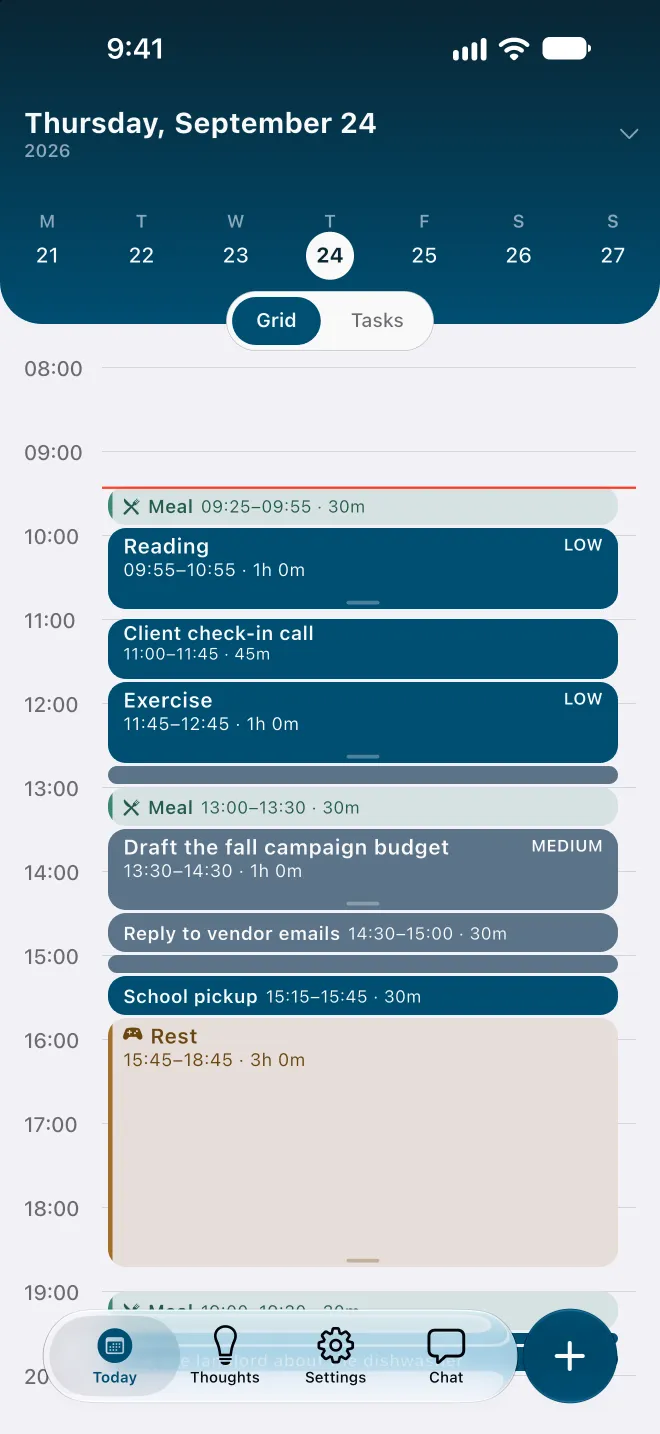
Re-planning inside today. When a task in Flowo runs over, the planner runs again from now, on its own: fixed events and pinned blocks stay put, and every other task is placed again in order of deadline and priority. Flowo then shows what moved and why. Rebuilding the day is free, and the free plan includes 7 Recovery fixes a week for tasks that can no longer make their deadline.
A warning before the day overflows. A task that cannot fit before its deadline carries a No room badge with roughly how much time is missing, and the Resolve schedule sheet may offer to move the deadline. Nothing changes until you confirm.
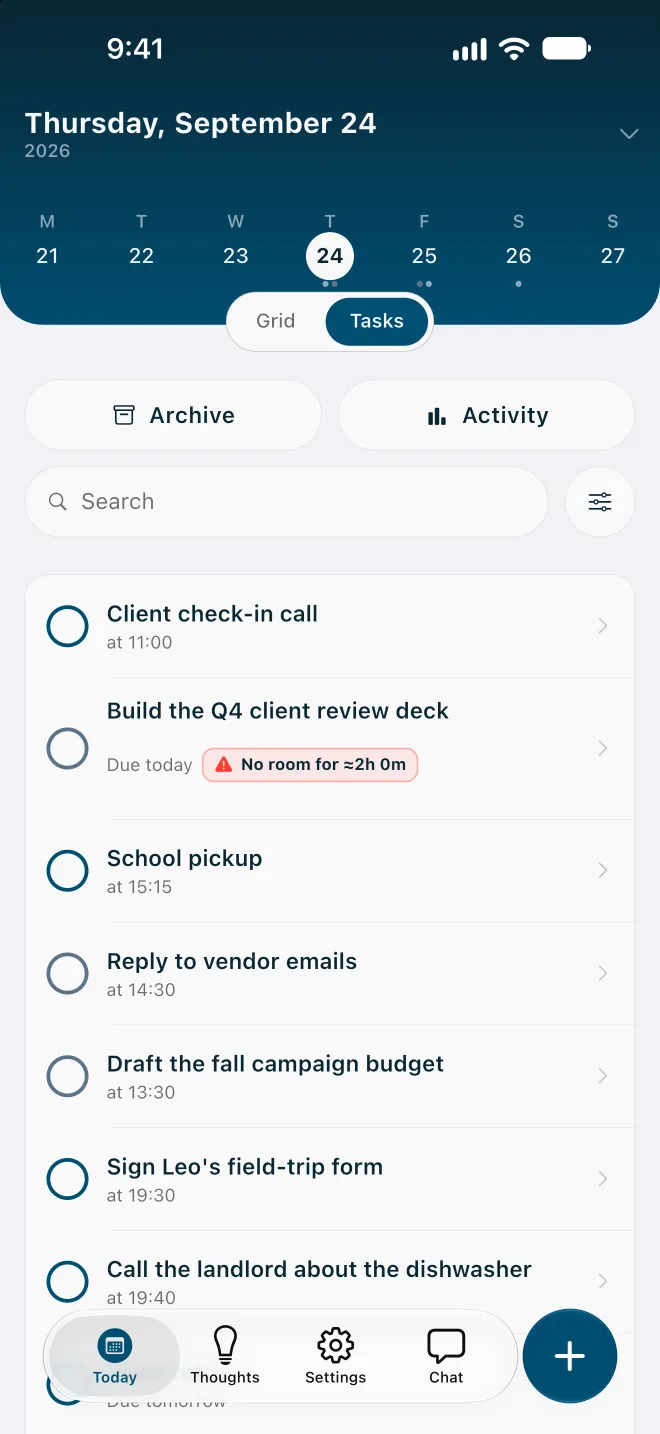
Meals, rest and sleep are part of the plan. They are placed before any task, and on an overfull day Flowo shortens rest first, then meals, and sleep last, never below the minimums set in My Day. Habits sit in the same plan as recurring blocks, and a recurring block is placed whole, so a 60-minute habit will not be split across two short gaps.
Fewer screens to look at. TickTick offers several views so you can choose how to see your tasks. Flowo has one main question to answer, what happens next today, and a grid and a task list that both show the planner's answer.
No account. Flowo needs no email login, and core planning records stay in encrypted local storage on the phone. Routine scheduling follows fixed rules on the device, so the same inputs give the same schedule.
One morning in each app
Take a morning with five tasks, a team call fixed at 11:30, and a form that has to be sent by 13:00. A 45-minute task that started at 9:00 is still open at 10:10.
In TickTick, the tasks sit in a list or on the Timeline where you placed them. To make room, you drag the later tasks along the Timeline yourself and decide which one gives way before the call.
In Flowo, stretching the task by 25 minutes places the rest of the morning again around the 11:30 call. If the form no longer fits before 13:00, it carries a No room badge with the missing time, and you see it at 10:10 rather than at 12:50.
Using TickTick and Flowo together
The two can split the work. TickTick holds the long list, the habit statistics and the focus sessions; Flowo plans the hours of the next day or two from the tasks that have a date. Flowo does not import from TickTick today, so tasks that need a time are added in Flowo with a rough duration.
- Keep lists, someday items and habit streaks in TickTick.
- Each evening, add tomorrow's dated tasks to Flowo with a rough duration and any deadline.
- Add the calls and appointments that cannot move as fixed events.
- When the day slips, let Flowo rebuild it rather than dragging blocks by hand.
Side by side, as of November 2026
| TickTick (its pages, 11 Nov 2026) | Flowo | |
|---|---|---|
| Platforms | Phones, computers, browser and email add-ins | iPhone and Android |
| Free version | 9 lists with 99 tasks each, 5 habits | Free download with 7 Recovery fixes and 5 Tidy Up runs a week; notes have no limit |
| Price | Premium at US$49.99 a year; US$4.99 a month on the US App Store | Flowo Pro at US$4.99 a month, US$29.00 a year or US$44.99 once |
| How tasks get a time | You set times and drag tasks on the Timeline | The planner places tasks from durations, deadlines and fixed events |
| When a task runs over | You move the later tasks yourself | Rebuilds the rest of today on its own and shows what moved |
| Habits and focus | Habit tracker with statistics and a Pomo timer | Habits placed as recurring blocks in the day plan |
| Calendars | Google Calendar and calendar subscriptions | None; events are added in Flowo |
Who should pick which
TickTick suits someone who wants every kind of view, a habit tracker with charts and a focus timer in one app, and is happy to arrange the hours by hand. Flowo suits a day that changes after it is planned, where the useful answer at ten in the morning is what still fits before the deadline and what has to move.
Flowo is free to download on the App Store for iPhone and on Google Play for Android. Flowo Pro is an optional in-app purchase: US$4.99 a month or US$29.00 a year, both starting with a 14-day free trial that needs a payment method, or US$44.99 once with no trial. Your store shows the local price before you confirm.
The full mechanics are on the page about how Flowo re-plans when the day slips. A matching page compares Flowo with Todoist, and the planner comparison covers eight more apps.
Questions
Is Flowo a TickTick alternative?
Yes, for planning one person's day on iPhone or Android when the plan changes during the day. TickTick fits better if you want habit statistics, a focus timer and many calendar views in one app.
Is TickTick free?
Yes. TickTick's upgrade page lists a free plan with 9 lists of 99 tasks each and 5 habits. Premium is US$49.99 a year on its website, and the US App Store also lists US$4.99 a month.
Does TickTick schedule tasks automatically?
Not on the pages we checked. TickTick's features page describes a Timeline where you drag tasks to adjust their start times and durations, and we found no description of automatic scheduling.
Is TickTick good for ADHD?
It depends on where the day goes wrong. TickTick is strong at capturing tasks and tracking habits, but it leaves the hours to you, so a day that slips has to be rearranged by hand.
Does Flowo have habits?
Yes. Habits are placed in the day plan as recurring blocks, beside tasks and fixed events, and a recurring block is placed whole, so a 60-minute habit is not split across two short gaps.
Sources
- TickTick upgrade page, accessed 2026-11-11
- TickTick features, accessed 2026-11-11
- TickTick on the App Store (US), accessed 2026-11-11