 Flowo
FlowoUpdated
The short version
- Flowo by BBMM Technologies (this site, flowoapp.com). A day planner for iPhone and Android. You write down what is on your mind, the planner places tasks around your fixed events, meals and sleep, and when a task runs over, one tap rebuilds the rest of the day. No account. App Store ID 6744169041, Google Play package com.u7wells.flowo_client.
- Flowo at getflowo.com. A web application that connects Google Calendar and Outlook Calendar, merges tasks and meetings into one week, and reschedules the week automatically. Its own pages describe it as a Motion, Sunsama, Reclaim or Akiflow alternative. Plans are Free, Start, Max and Team.
- "Flowo - ADHD Focus & Tasks" on the App Store. An iPhone app from an individual developer, Mathias Matejcik, with a daily task limit, timed focus sessions and a weekly progress view. App Store ID 6780164797. It is free with an in-app purchase called Flowo Premium.
The quickest way to check which one you have: open the app's store page and read the seller line. Ours says BBMM TECHNOLOGIES INC. on the App Store and BBMM Technologies Inc. on Google Play. The web calendar has no store listing at all; it runs in a browser at getflowo.com. The third app lists its developer by name.
Flowo by BBMM Technologies, the one on this site
This Flowo is a phone app for one person's day. It was built for days that do not go to plan: you set sleep, meals and working hours once, add the events that cannot move, and give each task a duration and, if it has one, a deadline. The planner then places the tasks into the free time in order of deadline and priority. The result is the Today grid, where every block is drawn to its length and a red line marks the current time.
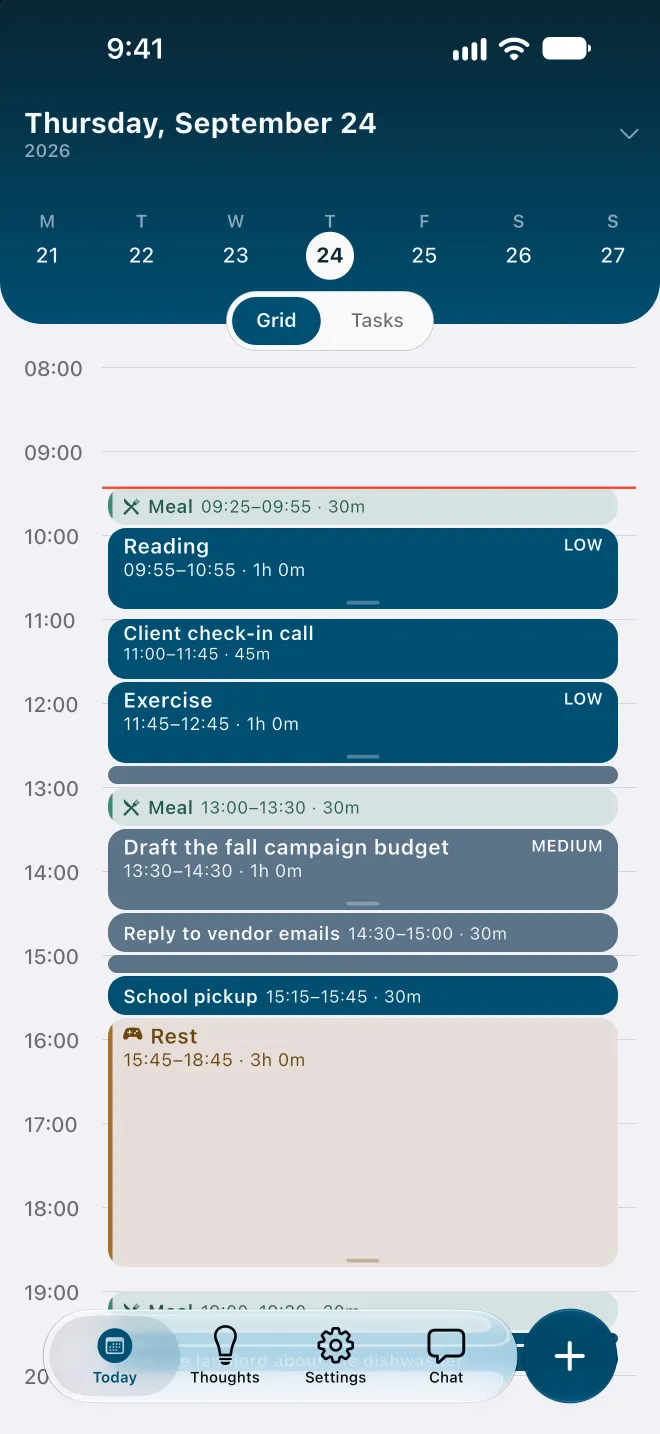
When a task runs over or a meeting moves, one tap of Recovery runs the planner again on the hours that remain. Fixed events stay where they are, every other task is placed again, and Flowo shows what moved. A task that no longer fits before its deadline carries a No room badge with roughly how much time is missing, so the gap is visible hours before the deadline rather than at it.
Routine scheduling in this Flowo is deterministic: the same inputs give the same schedule, and no language model arranges the day. Optional cloud features, such as describing your week in plain words during setup or breaking a task into steps, run only when you ask. There is no account to create, and planning data stays on the phone, encrypted. The methodology page explains the rules and their limits.
Flowo is free to download on the App Store for iPhone and on Google Play for Android. Flowo Pro is an optional in-app purchase: US$7.99 a month or US$49.99 a year, both starting with a 14-day free trial that needs a payment method, or US$89.99 once with no trial. Your store shows the local price before you confirm.
The publisher is BBMM Technologies Inc., a company registered in Nova Scotia, Canada, with two founders. The official website is flowoapp.com, the support site is the help centre linked in the footer, and the social profiles are listed on the About page. Any other website, app or profile called Flowo is not ours.
Flowo at getflowo.com, the web calendar
The product at getflowo.com is a different piece of software from a different publisher. Its pages, read on 28 October 2026, describe an AI calendar and task manager for the browser. It connects Google Calendar and Microsoft Outlook, shows meetings and tasks in one week view, and reschedules the week when a meeting lands or a task slot passes. Its feature list mentions a Brain Dump capture, an in-app assistant named Flowy, booking links, notes, a Kanban board on the higher plans and a morning brief.
Its pricing page lists four plans: Free at US$0 with 100 AI credits a month, one synced calendar, three projects and twenty active to-dos; Start at US$6.99 a month or US$69.90 a year; Max at US$9.99 a month or US$99.90 a year; and Team at US$5.99 per seat per month with a minimum of three seats. New signups get the first 14 days of Max without a card. The same page says the core calendar runs on web and desktop, and the site offers a mobile version as a web app rather than a store download.
Where the two overlap: both products capture loose notes, both place tasks into a calendar, and both rebuild a schedule when something changes. Where they differ: getflowo.com is built around synced work calendars and runs in a browser, while the Flowo on this site is a phone app that plans one person's day around sleep, meals and habits, keeps data on the device, and needs no account. If your day lives in Google Calendar or Outlook and you want tasks scheduled around meetings on a desktop, getflowo.com is the product to look at. If you want the plan on your phone and you want it to survive a morning that slips, this site is the right one.
"Flowo - ADHD Focus & Tasks", the other App Store app
A third product with the same name is on the App Store under ID 6780164797. Its listing, read on 28 October 2026, gives the subtitle "Plan, focus, get things done" and names the seller as Mathias Matejcik. The version history on the listing shows version 1.0 dated 24 June and version 1.1 dated 12 October.
The description presents it as a task manager with a daily task limit the person sets, timed focus sessions of 5 to 45 minutes with optional ambient sounds, a Brain Dump for stray thoughts, and a weekly progress view with tasks completed, focus time and best day. It states that it has no streaks. It is free to download, with an in-app purchase called Flowo Premium at the prices shown on its listing, and its description marks energy-aware task suggestions as part of that purchase.
Where it overlaps with ours: both are iPhone apps, both use the phrase Brain Dump, and both are aimed at people who find a long to-do list hard to start. Where it differs, from what the listing describes: it is built around a short daily list and focus timers, and its listing does not describe placing tasks into a timed day plan around fixed events, rebuilding the rest of the day when a task runs over, or an Android version. If a daily cap and a focus timer are what you want, that app is designed for exactly that. If you want the day laid out as blocks that move when the day changes, you are on the right site.
If you installed an app called Flowo and the screens do not match the demo video or the features page here, you most likely have the other one. Our help centre cannot answer questions about it, and a review left on its listing does not reach us.
Side by side, as of October 2026
| Flowo by BBMM Technologies (this site) | Flowo at getflowo.com | "Flowo - ADHD Focus & Tasks" | |
|---|---|---|---|
| Publisher | BBMM Technologies Inc., Halifax, Canada | The company behind getflowo.com | Mathias Matejcik |
| Where it runs | iPhone and Android apps | Web browser and desktop; mobile as a web app | iPhone |
| Store listing | App Store ID 6744169041; Google Play com.u7wells.flowo_client | None; sign up on the website | App Store ID 6780164797 |
| Account | None | Required | Not stated on the listing |
| What it plans | One person's day around sleep, meals, habits and fixed events | A work week across synced Google and Outlook calendars | A short daily list with focus sessions |
| When a task runs over | Recovery rebuilds the rest of today in one tap | Automatic week reschedule, per its pages | Not described on the listing |
| Free version | Free download; the planner works without a purchase | Free plan with monthly AI credits and limits | Free download |
| Paid plan | Flowo Pro: US$7.99 a month, US$49.99 a year or US$89.99 once | Start US$6.99, Max US$9.99, Team US$5.99 per seat, monthly | Flowo Premium, prices on its listing |
| Trial | 14 days on monthly and yearly | First 14 days of Max at signup | Not stated on the listing |
| Website | flowoapp.com | getflowo.com | Not stated on the listing |
Everything in the two right-hand columns comes from those products' own pages and listings on the date given. If their pages change, this table will lag behind them; the sources at the end of this page are the places to check.
How to find the right one in the stores
On an iPhone, searching the App Store for "Flowo" can show more than one result. Ours is titled Flowo: ADHD Day Planner with the subtitle Auto Time Blocking, Brain Dump, the seller is BBMM TECHNOLOGIES INC., and the icon is a single wave on a white tile. The direct link is apps.apple.com/app/id6744169041.
On Android, there is only one Flowo of the three on Google Play: ours, under the package name com.u7wells.flowo_client, with BBMM Technologies Inc. as the developer. The direct link is play.google.com/store/apps/details?id=com.u7wells.flowo_client.
The web calendar at getflowo.com is not in either store. If someone sent you a link that starts with getflowo.com, you were sent to that product, and this site cannot help with it.
For anything about ours, the features page lists what the app does, the videos page shows it on a real phone with chapters and transcripts, and the contact page reaches the two people who make it.
Questions
Is flowoapp.com the same as getflowo.com?
No. flowoapp.com is the website of Flowo by BBMM Technologies Inc., a day planner for iPhone and Android. getflowo.com is a separate web-based calendar product from a different publisher. The two companies are not connected.
Which Flowo app is on Google Play?
Only one of the three: Flowo by BBMM Technologies, under the package name com.u7wells.flowo_client. The web calendar at getflowo.com has no store listing, and "Flowo - ADHD Focus & Tasks" is listed on the App Store for iPhone.
How do I know which Flowo I installed on my iPhone?
Open the app's page in the App Store and read the seller line under the title. Flowo by BBMM Technologies shows BBMM TECHNOLOGIES INC. and the title Flowo: ADHD Day Planner. The other iPhone app shows a different seller and the title Flowo - ADHD Focus & Tasks.
Does Flowo by BBMM Technologies need an account?
No. The app works without an account, and planning data stays on the phone, encrypted. The web calendar at getflowo.com requires signing up on its website.
Why are there three products called Flowo?
Short product names overlap often, and the three were published by three unrelated makers. This page exists so that people who searched for the name can find the one they meant, using each product's own pages rather than our description of them.
Sources
- Flowo by BBMM Technologies on the App Store, accessed 2026-10-28
- Flowo by BBMM Technologies on Google Play, accessed 2026-10-28
- getflowo.com pricing page, accessed 2026-10-28
- getflowo.com llms.txt, accessed 2026-10-28
- "Flowo - ADHD Focus & Tasks" on the App Store (US), accessed 2026-10-28