Time blindness
A time blindness app that shows the day as blocks
"Time blindness" is the everyday name many people use for losing track of how long things take and how much of the day is left. Flowo is a planner for iPhone and Android that draws the day as a grid of blocks, puts meals, rest and sleep in first, and tells you plainly when a task no longer fits.
Updated
What people mean by time blindness
On this page we use "time blindness" the way people use it in conversation and online: an everyday phrase for a handful of familiar moments.
- Starting something "for ten minutes" and looking up two hours later.
- Believing there is plenty of time until a deadline, and then suddenly there is none.
- Guessing that five tasks will fit in an afternoon that holds two.
- Noticing at 3 p.m. that lunch never happened.
Flowo does not assess or measure anything about you, and it does not assume you have any condition. What it can do is make time visible on the screen, so there is less to hold in your head and less to estimate from scratch.
Seeing time as blocks
The Today screen has a Grid view. Hours run down the left side, and every task, event, meal and rest period is a block whose height matches its length. A one-hour task is twice as tall as a 30-minute one. A red line marks the current time, so the gap between now and the next fixed event is something you can see instead of work out.
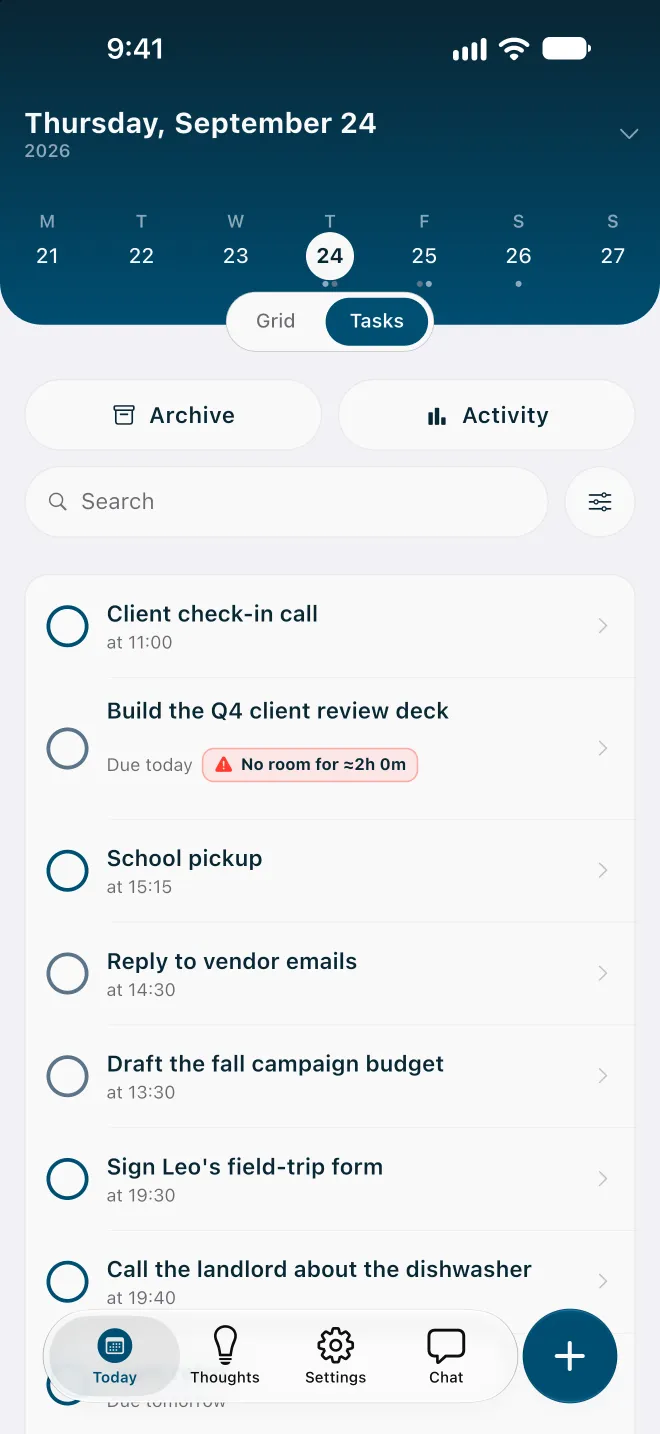
Above the grid is a strip with the days of the week. Tapping a day shows its plan, which helps when the question is less "what now" and more "is Friday already full". The Tasks view lists the same day as rows, each with the time it starts, for when a list is easier to read than a picture.
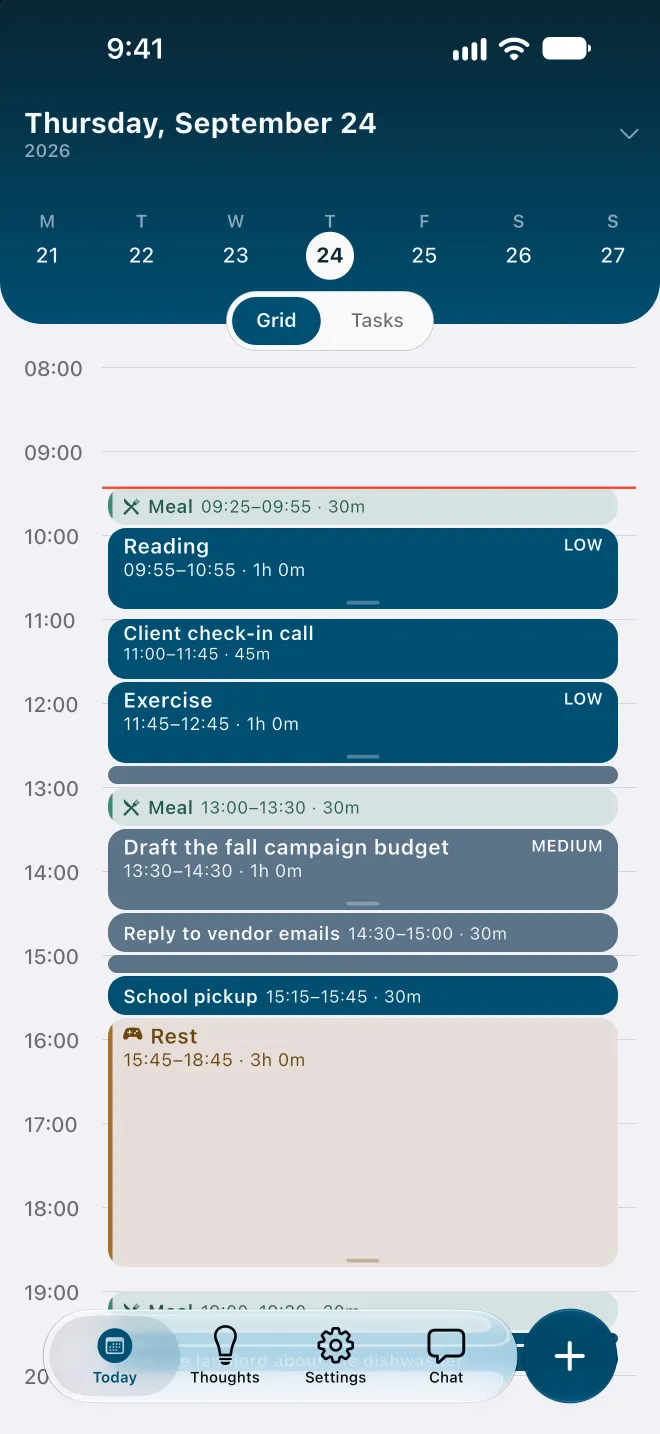
Every block on the grid was placed by the planner from what you entered: durations, deadlines, fixed events, habits and daily boundaries. Open a block and choose Why here? to see what decided its place, such as a category window, your productive hours or a day that was already tight.
Meals, rest and sleep go in first
When a day is planned task by task, the things that keep you going are the first to disappear. Flowo builds the daily rhythm before it places any task. You set when you sleep, when you eat and how much rest you want. Those blocks are in the plan before work competes for the space.
If the day is overfull, Flowo does not silently take the time back. It shortens rest first, then meals, and sleep last, and never below the minimums you set in My Day. A task that only fits this way is labelled Uses recovery time, so you can see the trade before you accept it.
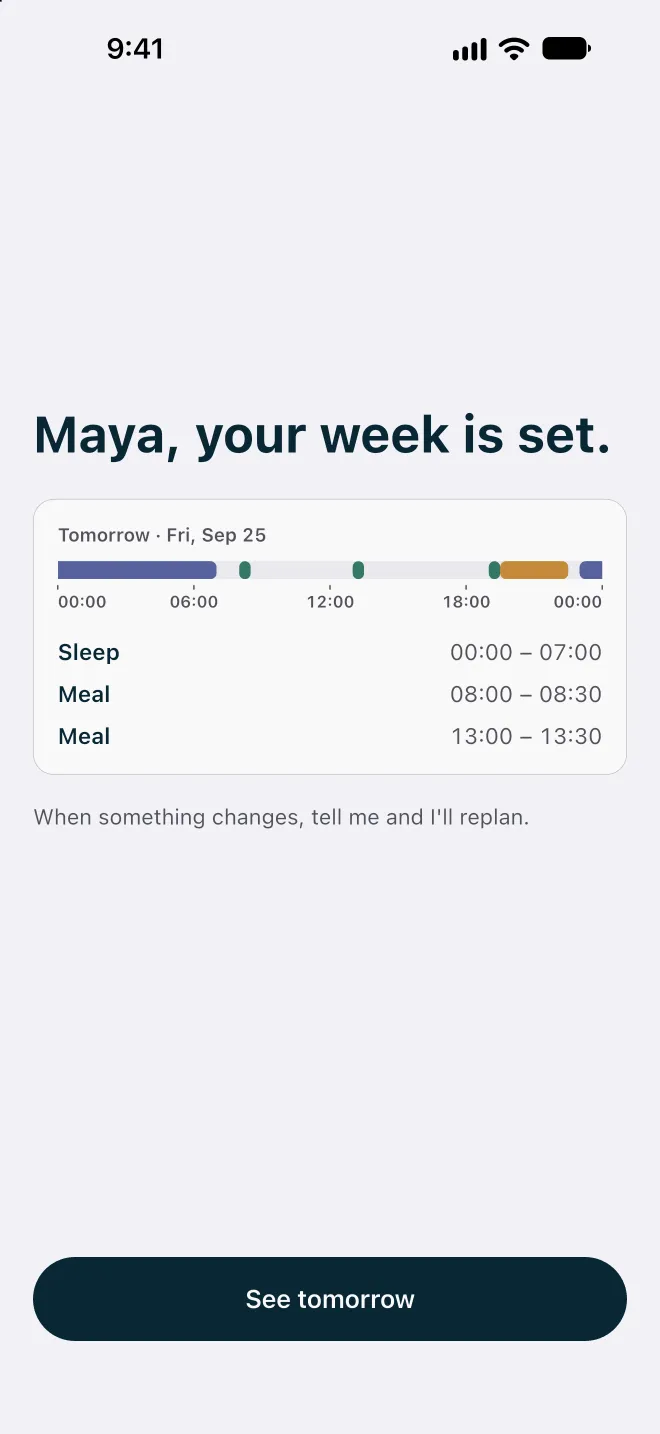
At the end of setup, Flowo shows tomorrow's rhythm as a single line: sleep, meals and the space between them. You can change any of these later in My Day, and the next plan follows the new times.
A badge that tells you the day is full
Estimating is hard even when you are good at it. So Flowo does the adding up. After each run, every task shows one of three statuses: on track, fits only by using recovery time, or No room.
A No room for ≈2h 0m badge means the task cannot fit before its deadline, even after shortening what you allowed. The number is roughly how much time is missing. Seeing it at 9:30 gives you a morning to move the deadline, drop something smaller, or ask someone for help. Without it, the same fact tends to arrive at 11:59.
Tapping the badge opens a sheet that may offer ways to make room, such as moving the deadline. What it can offer depends on the day, and sometimes it has nothing safe to suggest. It never applies a change until you confirm it. The page on how Flowo re-plans covers this in detail.
Estimates you can correct
The plan is only as good as the durations in it. Flowo does not hide that. Every duration is a number you can see and change, and the next run uses the new value.
- Start with a rough guess. 30 minutes or an hour is fine; the grid will show quickly whether it was optimistic.
- When a task runs over, change its duration instead of fighting the plan. The rest of the day is rebuilt around the real number.
- An optional estimate feature can suggest a duration when you create a task. It is a cloud feature, it only runs when it is switched on, and you can always overwrite the suggestion.
Over time, confirmed history also feeds into placement: Why here? can show that a time was chosen because it usually works for you.
Capture first, so nothing is left floating
Part of losing track of time is losing track of the things you meant to do with it. The Thoughts screen takes a note without asking for a folder or a date. If a note mentions a time, such as "before Friday", Flowo can set a reminder for it. When you are ready, a note becomes a task with a duration, and the planner finds it a place. Read more about capturing first and sorting later.
Your plan stays on your phone
Flowo works without an email login or account. Core planning records are kept in encrypted local storage on the device, and the scheduler runs there too. Content leaves the phone only when you use a disclosed cloud feature, such as describing your week in your own words or tidying notes. The Privacy Policy lists where that content goes.
Flowo is a planning tool. It is not a medical device, it does not diagnose or treat any condition, and there is no published evidence about its effect on ADHD or on any health outcome.
Flowo is free to download on the App Store for iPhone and on Google Play for Android. Flowo Pro is an optional in-app purchase: US$7.99 a month or US$49.99 a year, both starting with a 14-day free trial that needs a payment method, or US$89.99 once with no trial. Your store shows the local price before you confirm.
Questions
Is time blindness a diagnosis?
No. "Time blindness" is an everyday phrase people use for losing track of time and underestimating how long things take. Flowo uses it the same way, and it does not assess, measure or assume any condition.
How does Flowo make time visible?
Flowo draws each day as a grid where every task, event, meal and rest period is a block sized to its duration, with a red line at the current time. You can see how much of the day is left and what comes next without adding it up yourself.
Does Flowo plan meals and sleep?
Yes. You set when you sleep, eat and rest, and Flowo places those blocks before any task. It only shortens them on an overfull day, in the order rest, meals, then sleep, and never below the minimums you choose.
What happens when I have more tasks than time?
The task that cannot fit gets a "No room" badge showing roughly how much time is missing. You can then move the deadline, change the task, or open the Resolve schedule sheet to see any options the planner can prepare.
Do I need an account to use Flowo?
No. Flowo works without an email login or account, and core planning records are stored in encrypted local storage on your phone.
Is Flowo free?
Flowo is free to download on iPhone and Android. Flowo Pro is optional: US$7.99 a month or US$49.99 a year with a 14-day free trial that needs a payment method, or US$89.99 once.