Updated
The short version
- Tiimo shows a colour-coded plan that you arrange by hand, and adds an AI co-planner that can draft and adjust it. It runs on iPhone, iPad, Mac, Apple Watch and Android, and its web planner comes with a trial or a subscription.
- Flowo places your tasks for you from their durations, deadlines and the fixed events around them. When a task runs over, one tap rebuilds the rest of today and shows what moved. It runs on iPhone and Android.
- Free use. Both apps have a free version. Tiimo offers a 7-day trial on its yearly plan only. Flowo Pro starts with a 14-day free trial on both the monthly and the yearly plan.
If the plan made in the morning usually holds, Tiimo covers more devices and more ways to shape the day. If the plan tends to break by mid-morning, the rest of this page shows how Flowo handles that moment.
When Tiimo is the better choice
For several needs, Tiimo is the stronger pick today. Each point below comes from Tiimo's own pages or its store listings.
- More devices. Tiimo lists iPhone, iPad, Mac, Apple Watch, Android and a web planner. Flowo has no Mac, Apple Watch or web app today.
- A plan you shape by hand. The App Store listing describes a colour-coded daily overview with drag-and-drop tasks and home screen widgets. People who like to place every block themselves get more control in Tiimo.
- Timers on the wrist. Tiimo's iOS 27 update, as its App Store page describes it, adds a timer to each subtask and a focus timer view on Apple Watch.
- A planning assistant you talk to. Tiimo's AI planning page says its co-planner breaks tasks into steps and estimates how long each one takes.
- Family profiles and a track record. The App Store listing offers up to 5 profiles shared with family, while Flowo plans one person's day. Apple chose Tiimo as its iPhone App of the Year for 2025, and the listing shows Tiimo in English and 23 more languages.
Where Flowo is different
Recovery rebuilds the rest of the day. When a task runs over or a meeting moves, one tap of Recovery runs the planner again on the hours that remain. Fixed events and pinned blocks stay where they are, and every other task is placed again in order of deadline and priority. Flowo then shows what moved and why. The free plan includes 7 Recovery runs a week; Flowo Pro removes the weekly limit.
The day drawn as blocks. The Today grid shows each task, event, meal and rest period as a block whose height matches its length, with a red line at the current time. The gap before the next fixed event is on the screen, so nobody has to work it out.
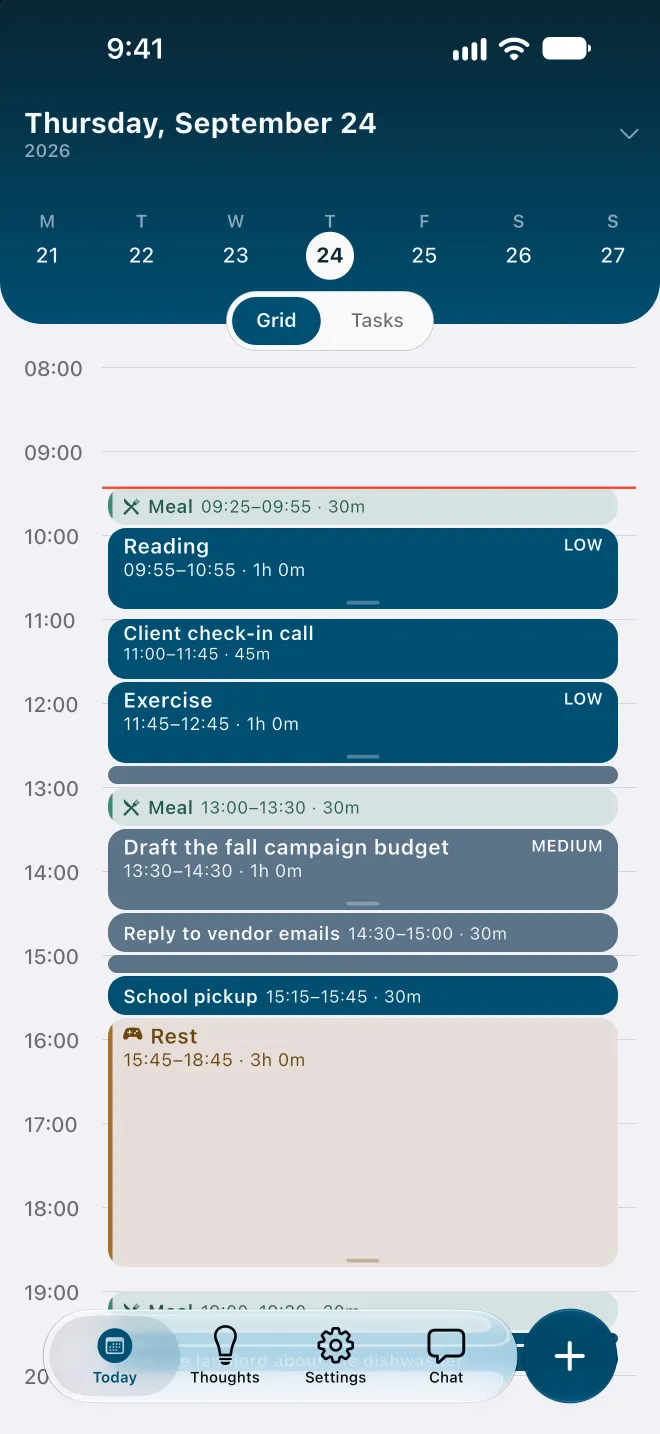
Meals, rest and sleep go in first. These blocks are placed before any task. On an overfull day Flowo shortens rest first, then meals, and sleep last, never below the minimums set in My Day, and labels any task that depends on it Uses recovery time.
A plain answer when a task no longer fits. A task that cannot fit before its deadline carries a No room badge with roughly how much time is missing. Tapping the badge opens a sheet that may offer to move the deadline or make room in other ways, and nothing changes until you confirm.
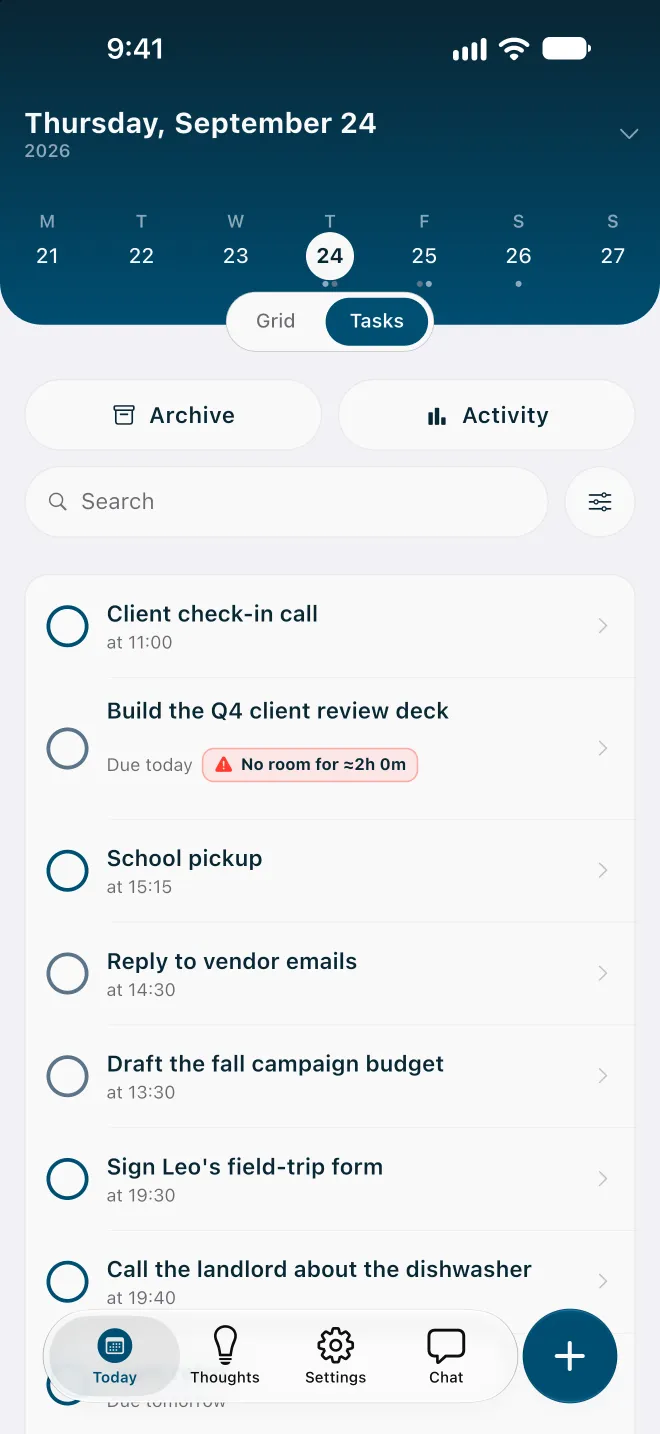
Capture before sorting. Brain Dump, in the Thoughts tab, saves a note with no folder or date. A note becomes a task once it has a duration, and the planner then finds it a place. The Brain Dump guide covers the details.
Fixed rules on the phone. Routine scheduling in Flowo is deterministic: the same inputs give the same schedule, and no language model arranges the day. Tiimo's AI planning page describes a co-planner that "reshuffles the day for you" when you are running late. Flowo's rebuild follows published rules, and the methodology page lists their limits.
One late morning in each app
Take a morning where a 9:00 task planned for 30 minutes is still open at 9:40 and needs another half hour. A client call is fixed at 11:00, and a two-hour deck is due at noon.
Tiimo's AI planning page shows its co-planner taking a spoken request to move every task 10 minutes later, and its Google Play listing says the schedule can be adjusted as the day changes.
In Flowo, adding 30 minutes to the task, or one tap of Recovery, runs the planner again on the rest of the morning around the 11:00 call. If the deck no longer fits before noon, it carries a No room badge with the missing time, and the Resolve schedule sheet can offer to move its deadline. The gap is visible at 9:40, more than two hours before the deadline.
Side by side, as of October 2026
| Tiimo (its pages and store listings, 9 Oct 2026) | Flowo | |
|---|---|---|
| Platforms | iPhone, iPad, Mac, Apple Watch and Android; web planner with a trial or subscription | iPhone and Android |
| Free version | Basic planner, limited AI chats and 1 profile, per the App Store listing | Free download with 7 Recovery runs and 5 Tidy Up runs a week; notes have no limit |
| Paid plan | Tiimo Pro, monthly or yearly; the pricing page lists no amounts, and the store shows the local price | Flowo Pro at US$7.99 a month, US$49.99 a year or US$89.99 once |
| Free trial | 7 days, on the yearly plan only | 14 days on monthly and yearly, with a payment method |
| When a task runs over | The AI co-planner "reshuffles the day for you" | Recovery rebuilds the rest of today in one tap and shows what moved |
| When a task cannot fit | No mention on the pages we read | No room badge with roughly how much time is missing |
| Shared use | Up to 5 family profiles | One person's day |
Trying Flowo
Flowo is free to download on the App Store for iPhone and on Google Play for Android. Flowo Pro is an optional in-app purchase: US$7.99 a month or US$49.99 a year, both starting with a 14-day free trial that needs a payment method, or US$89.99 once with no trial. Your store shows the local price before you confirm.
Setup takes one sitting: sleep, meals and working hours first, then the fixed events, then the tasks that have deadlines, each with a realistic duration. A No room badge on the first day marks the place where the list and the hours disagree.
The full mechanics are on the page about how Flowo re-plans when the day slips. The Journal has a shorter note, Flowo vs Tiimo, and a matching page compares Flowo with Structured.
Questions
Is Flowo a Tiimo alternative?
Yes, for planning one person's day on iPhone or Android when the plan keeps changing after it is made. Tiimo covers more devices, including iPad, Mac, Apple Watch and the web.
Is there a free Tiimo alternative?
Flowo is free to download, and its free plan includes 7 Recovery runs a week and unlimited Brain Dump notes. Tiimo also has a free version with a basic planner. Flowo Pro is optional and starts with a 14-day free trial on the monthly and yearly plans.
Is there a Tiimo alternative for Android?
Flowo runs on Android through Google Play and on iPhone through the App Store. Tiimo is on Google Play as well, so both apps work on an Android phone.
Does Flowo use AI to re-plan the day?
No. Routine scheduling in Flowo follows fixed rules on the phone, so the same inputs give the same schedule. Optional cloud features, such as describing your week in your own words, run only when you use them.
Can I see what changed after a re-plan?
Yes. After Recovery, Flowo shows what moved and why. The Why here? option on any block shows what decided its place and which time came second.
Sources
- Tiimo pricing and device FAQ, accessed 2026-10-09
- Tiimo AI planning, accessed 2026-10-09
- Tiimo on the App Store (US), accessed 2026-10-09
- Tiimo on Google Play, accessed 2026-10-09
- Apple Newsroom, 4 December 2025, accessed 2026-10-09