Updated
The short version
- Structured puts tasks, events and routines on one timeline that you arrange by drag and drop. It runs on iPhone, iPad, Mac, Apple Watch, Android and the web, with a free version and an optional Pro plan that adds AI day planning.
- Flowo takes durations, deadlines, fixed events and daily boundaries, and places the work itself. It runs on iPhone and Android.
- Re-planning. Structured's Replan is a Pro feature that walks through unfinished tasks from earlier days. Flowo's Recovery rebuilds the hours left in today, and the free plan includes 7 runs a week.
Two ways to re-plan
Both apps help when the plan and the day drift apart. They work on different parts of the problem.
Structured's Replan. Structured announced Replan on 2 June 2025. It opens from a long press on a day's date, or from a reminder, and walks through each unfinished task from the past one at a time. Each task can be checked off, deleted, given a new time in the schedule or moved to the inbox. The App Store listing describes Replan as a feature that "automatically reschedules missed or forgotten tasks". Replan requires Structured Pro. The help centre, edited on 1 June 2026, lists it for iOS, and its Android and web columns leave it out.
Flowo's Recovery. Recovery works on today. One tap runs the planner again on the time that remains. Fixed events and pinned blocks stay put. Meals and sleep are placed before any task, and the remaining tasks go back in order of deadline and priority. Flowo then shows what moved and why.
A task that no longer fits before its deadline carries a No room badge with roughly how much time is missing. The Resolve schedule sheet may offer to move the deadline, and nothing in it applies until you confirm.
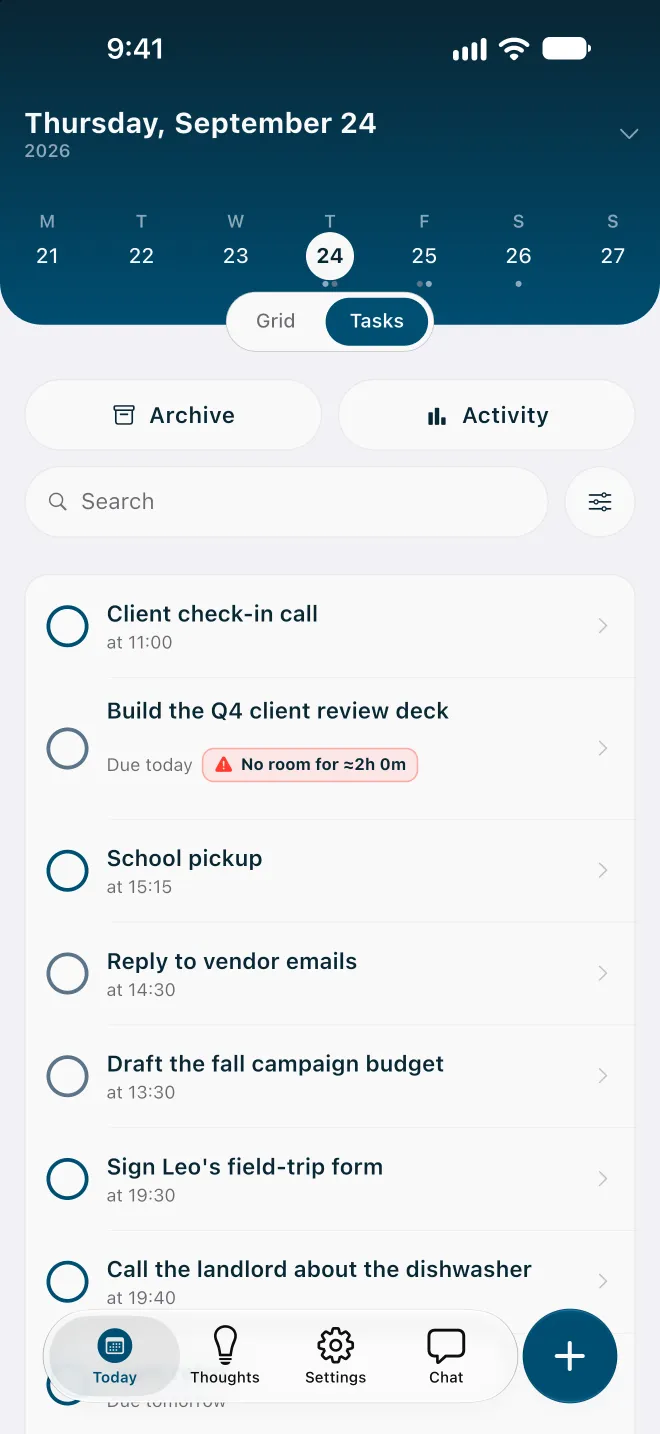
Structured's Replan sorts tasks left over from earlier days, one by one. Flowo's Recovery recomputes the hours left in today in a single pass, on iPhone and on Android.
When Structured is the better choice
- Every device. Structured runs on iPhone, iPad, Mac, Apple Watch, Android and the web, and syncs between them. Flowo has no Mac, Apple Watch or web app today.
- A timeline you arrange. Placing each block by hand on a colour-coded timeline is part of Structured's free version. People who want full manual control of the day get it there.
- Calendar import. Structured Pro brings existing calendars into the timeline on iOS, Android and the web, according to its help centre.
- Languages. The App Store listing shows Structured in English and 27 more languages.
- Track record. Apple lists Structured as an Editors' Choice on its App Store page.
Where Flowo is different
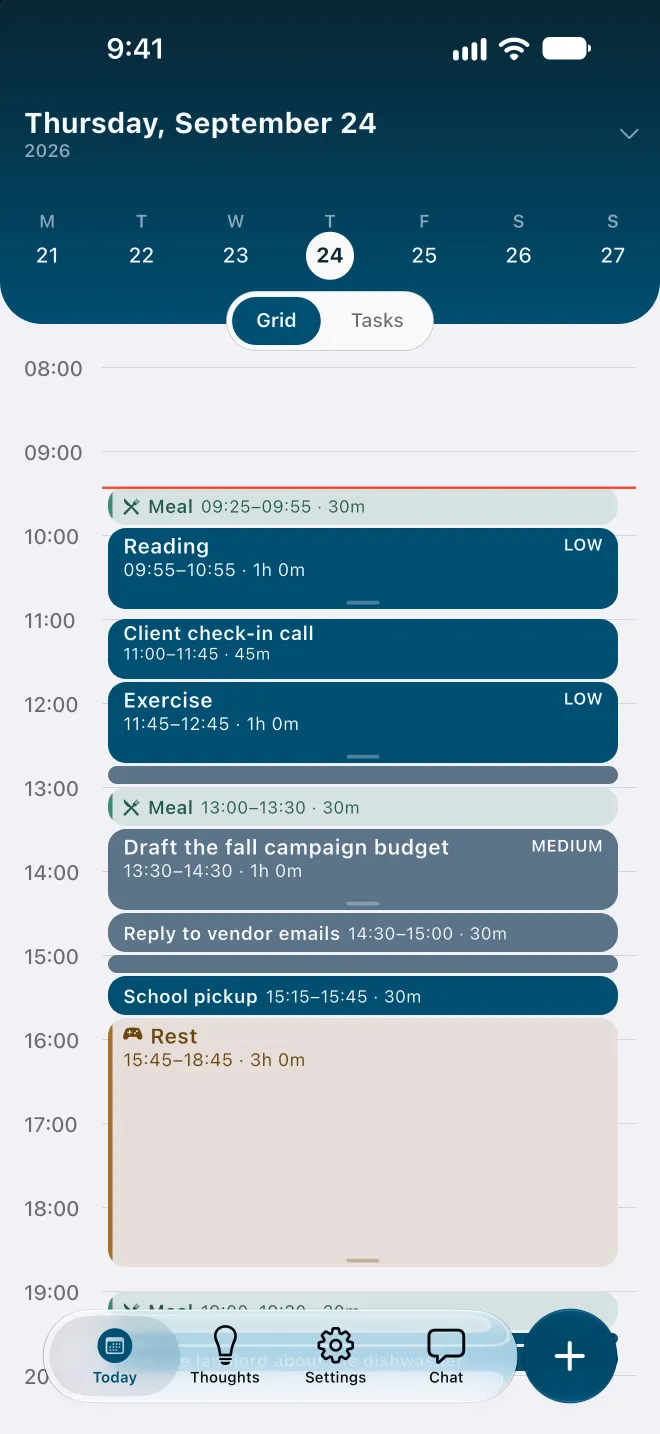
The day is computed for you. Tasks go in with a duration, a deadline and a priority, beside fixed events, habits and daily boundaries. The planner places the work in the free time before each deadline, and Why here? on any block shows what decided its place.
Meals, rest and sleep come first. They are in the plan before any task. On an overfull day Flowo shortens rest first, then meals, and sleep last, never below the minimums set in My Day.
Capture with no sorting. Brain Dump, in the Thoughts tab, keeps notes without a folder or a date, and a note becomes a task when it needs a time. Structured has a free inbox for quick capture as well.
Fixed rules and no account. Routine scheduling runs on the phone and gives the same schedule for the same inputs. Flowo needs no email login or account, and core planning records stay in encrypted local storage on the device.
Side by side, as of October 2026
| Structured (its pages and store listings, 9 Oct 2026) | Flowo | |
|---|---|---|
| Platforms | iPhone, iPad, Mac, Apple Watch, Android and web | iPhone and Android |
| How the day is built | Tasks placed by hand on a timeline; AI day planning on Pro | The planner places tasks from durations, deadlines and fixed events |
| Free version | Timeline, inbox, subtasks, notes and widgets | Free download with 7 Recovery runs and 5 Tidy Up runs a week; notes have no limit |
| Paid plan | Structured Pro, monthly, yearly or lifetime; prices vary by region and show in the store | Flowo Pro at US$7.99 a month, US$49.99 a year or US$89.99 once, with a 14-day trial on monthly and yearly |
| Re-planning | Replan (Pro) walks through unfinished tasks from past days, one at a time | Recovery recomputes the rest of today in one tap and shows what moved |
| Re-planning on Android | Replan listed for iOS; the Android and web columns leave it out | Recovery works on iPhone and Android |
Moving a day from Structured to Flowo
The move is by hand and takes one sitting. It also works as a review of what the timeline is carrying.
- Setup asks for sleep, meal and working hours, through a few question cards or a short description of the week.
- Fixed events from the Structured timeline go in first, such as calls and school pickups. Flowo keeps them where they are.
- Each task with a deadline goes in next, with the duration it usually takes.
- Items from the Structured inbox fit in Brain Dump, and a note becomes a task once it needs a time.
After that, the statuses show the result. A No room badge on the first day marks where the list and the hours disagree.
Who should pick which
Structured suits a day that mostly holds once it is drawn, and a person who wants the same timeline on a computer and a watch. Flowo suits a day that changes after it is planned, on an iPhone or an Android phone, where the useful answer at 10:00 is what still fits before 17:00 and what has to move.
Flowo is free to download on the App Store for iPhone and on Google Play for Android. Flowo Pro is an optional in-app purchase: US$7.99 a month or US$49.99 a year, both starting with a 14-day free trial that needs a payment method, or US$89.99 once with no trial. Your store shows the local price before you confirm.
The full mechanics are on the page about how Flowo re-plans when the day slips. The Journal has a shorter note, Flowo vs Structured, and a matching page compares Flowo with Tiimo.
Questions
Is there an app like Structured that works on Android?
Structured itself is on Google Play, and its help centre lists Replan for iOS. Flowo runs on Android and iPhone, and its one-tap Recovery works on both.
Is there an app like Structured but free?
Structured has a free version with the timeline, the inbox and subtasks. Flowo is free to download, and its free plan includes 7 Recovery runs a week and unlimited Brain Dump notes.
How is Flowo's Recovery different from Structured's Replan?
Structured's Replan walks through unfinished tasks from past days one at a time, and each can be checked off, deleted, given a new time or sent to the inbox. Flowo's Recovery recomputes the remaining blocks of today in one tap and then shows what moved.
Do I have to arrange the timeline myself in Flowo?
No. You enter tasks with durations and deadlines, plus fixed events and daily boundaries, and Flowo places the work. A block you pin stays where you put it.
How much does Flowo cost?
Flowo is free to download on iPhone and Android. Flowo Pro is optional and costs US$7.99 a month or US$49.99 a year, both with a 14-day free trial that needs a payment method, or US$89.99 once.
Sources
- Structured home page, accessed 2026-10-09
- Structured: access everywhere, accessed 2026-10-09
- Structured blog: Replan, 2 June 2025, accessed 2026-10-09
- Structured help: free and Pro features, accessed 2026-10-09
- Structured help: what is Structured Pro, accessed 2026-10-09
- Structured on the App Store (US), accessed 2026-10-09
- Structured on Google Play, accessed 2026-10-09