 Flowo
Updated
How a day usually falls apart
Most broken days break in one of three ways, and each needs a slightly different fix.
- Something runs long. A task planned for an hour takes two, and every block below it is now in the wrong place.
- Something new arrives. A sick child, an urgent request from a manager, a car that will not start. The day gains a fixed commitment it did not have at breakfast.
- Nothing gets started. The plan is fine on paper, but the first hours go to email, a phone or a hard start, and by noon the morning is gone.
In all three cases the plan you made in the morning is no longer true. The common mistake is to keep following it anyway, or to drop it completely and drift until evening. A plan that cannot bend stops getting used, and that is often the moment people give up on planners in general. The fix is smaller than it feels: rebuild only the hours that are left.
Five steps to rescue the rest of the day
These steps work with a notebook, a calendar or any planner app. They take about ten minutes.
- Stop and look at the clock. Write down the time now and the time your day realistically ends. The space between them is the only time you are planning. Whatever happened this morning is finished.
- Mark what cannot move. Calls, pickups, appointments, meals and sleep. Put them in first, because a plan that skips dinner tends to fall apart again at 19:00.
- List what is due today and only today. Not everything on your list, just the things with a deadline before tomorrow. Give each an honest duration, then add a quarter to it.
- Add it up and cut. If the durations do not fit in the free time, something has to move. Pick it now: move a deadline, ask for help, shorten a task, or drop it. Deciding at 14:00 is easier than discovering at 17:55.
- Place the rest, smallest useful step first. Put the remaining tasks into the free time in deadline order. If starting is the hard part, make the first block short and concrete, such as "open the report and write the first heading".
The arithmetic in step four is the part people skip, because it is unpleasant to do in the middle of a bad day. It is also the part a planner app can do for you. The next three sections show how each app handles it.
How Motion handles a day that changes
Everything in this section comes from Motion's website as it read on 22 November 2026. Its home page is titled "The AI Powered SuperApp for Work" and says it is "built for individuals and teams of all sizes".
- The AI Calendar page says Motion "instantly recalculates your schedule when plans change" and "reshuffles your entire day (and week) in seconds".
- It says Motion "flags when you've scheduled more than you can handle" and alerts you to at-risk deadlines, giving you time to "extend the deadline, or delegate tasks".
- The pricing page lists two plans, Pro AI and Business AI, priced per seat, with a free trial. Pro AI lists iOS, Android and desktop apps.
In practice, Motion does steps two to five for you, on a work calendar. It is the most automatic of the three, and it also covers projects, meetings and teams. Prices change with billing period and team size, so check Motion's pricing page; our Motion comparison has the figures from our September check.
How Sunsama handles a day that changes
Everything in this section comes from Sunsama's pages as they read on 11 November 2026.
- Sunsama is built around a guided planning routine. You pull tasks in from tools such as Asana, Jira, Notion and Todoist, decide how long each gets, and drag them onto your calendar.
- Its timeboxing page says a task you lock "stays locked in place, with the rest of your tasks auto-adjusted to flow around it".
- Its help centre says unfinished tasks "automatically roll over to the next day's task list if they are left incomplete at midnight".
- Its pricing page lists US$22 a month, or US$17 a month billed yearly, after a 14-day trial with no card, and says there is no free plan.
Sunsama's answer to a broken day is calm and deliberate: you rearrange today yourself, and whatever is left moves to tomorrow. That suits people who like to choose each block by hand and who plan at a computer. Our Sunsama comparison goes into more detail.
How Flowo handles a day that changes
Flowo is a day planner for iPhone and Android. You give it tasks with durations and deadlines, fixed events, and your daily boundaries for sleep, meals and rest. When something changes, it rebuilds the rest of today from those inputs.
- Steps two and five are automatic. Sleep, meals, rest and fixed events go in first. Tasks are then placed in the free time before each deadline, in order of deadline and priority.
- Step four is done for you. After each re-plan, every task shows one of three answers: on track, fits only by using recovery time, or No room with roughly how much time is missing.
- You make the cut. Tap a No room badge and the Resolve schedule sheet may offer to move the deadline or make room in other ways. Nothing changes until you confirm.
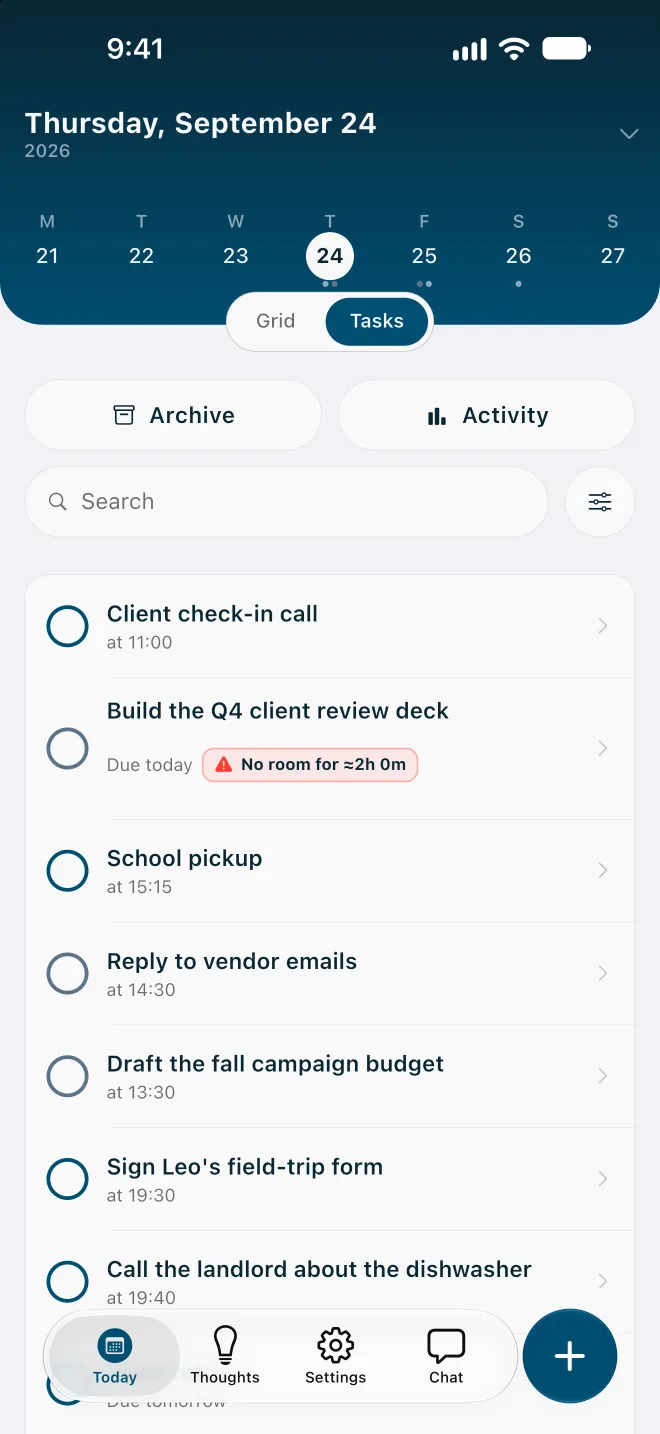
Routine scheduling in Flowo follows fixed rules on the phone, so the same inputs give the same plan, and Why here? on any block shows what decided its place. Rebuilding the day is free, and the free plan includes 7 Recovery fixes a week for tasks that can no longer make their deadline. The full mechanics are on the page about how Flowo re-plans when the day slips.
Side by side
| Motion (its pages, 22 Nov 2026) | Sunsama (its pages, 11 Nov 2026) | Flowo | |
|---|---|---|---|
| When the day changes | Recalculates the schedule automatically | You rearrange; unfinished tasks roll over at midnight | Rebuilds the rest of today from your inputs |
| When there is too much | Flags over-scheduling and at-risk deadlines | You see the day on your calendar and decide | Per-task No room badge with the missing time |
| Who places the tasks | The app | You, by dragging to a time slot | The app, around what you pinned |
| Sleep, meals and rest | Not covered on the pages we read | Not covered on the pages we read | Placed first, shortened only to your minimums |
| Built for | Individuals and teams of all sizes | Working days planned at a desk | One person's day, on a phone |
| Free use | Free trial; no free plan listed | 14-day trial; no free plan | Free download, with 7 Recovery fixes a week |
When Motion or Sunsama is the better choice
- Motion fits better if you plan work with a team, want projects, meetings and docs in the same tool, or work mostly at a desktop computer.
- Sunsama fits better if your tasks arrive from many tools, your calendar is booked by other people through Google, Outlook or iCloud, and you like choosing every block yourself.
- Neither app, nor Flowo, is needed if your day rarely changes. The five steps above on paper are enough.
Flowo has no desktop app, does not import other calendars today, and plans one person's day. If any of those matters, start with one of the others.
Who made this page
Flowo is made by BBMM Technologies Inc., the company that publishes this page. We quoted Motion and Sunsama from their own pages on the dates above, and they may have changed since. If something here is out of date, write to us from the contact page and we will correct it.
Flowo is free to download on the App Store for iPhone and on Google Play for Android. Flowo Pro is an optional in-app purchase: US$4.99 a month or US$29.00 a year, both starting with a 14-day free trial that needs a payment method, or US$44.99 once with no trial. Your store shows the local price before you confirm.
Questions
What should I do when my day falls apart?
Plan only the hours that are left. Mark what cannot move, list what is due today, add up the durations, cut what does not fit, and place the rest in deadline order.
Which app re-plans my day automatically?
Motion and Flowo both rebuild the schedule when plans change. Sunsama leaves the rearranging to you and rolls unfinished tasks over to the next day at midnight.
Is Flowo a Motion or Sunsama alternative?
Yes, for planning one person's day on iPhone or Android. Motion covers teams and projects, and Sunsama connects many work tools and calendars, which Flowo does not.
Does Flowo use AI to re-plan the day?
No. Routine scheduling in Flowo follows fixed rules on your phone, so the same inputs give the same plan. Optional cloud features run only when you use them.
Is there a free app that re-plans the day?
Flowo is free to download on iPhone and Android, and rebuilding the day is free. The free plan includes 7 Recovery fixes a week; Flowo Pro removes that limit.
Sources
- Motion home page, accessed 2026-11-22
- Motion AI Calendar, accessed 2026-11-22
- Motion pricing, accessed 2026-11-22
- Sunsama pricing, accessed 2026-11-11
- Sunsama timeboxing, accessed 2026-11-11
- Sunsama help: task rollover, accessed 2026-11-11