 Flowo
FlowoYes, for the routine job of placing tasks into free time, provided you can move or pin any block and you spend a minute reviewing each plan before you follow it. Research on algorithms shows that people stick with them when they keep some control over the result, and that people who stop checking automated output miss its errors. The evidence is indirect: no controlled study has tested automatic daily planners, so these findings come from forecasting experiments and from clinical and workplace automation.
What the research says
One visible mistake makes people abandon an algorithm. In five studies with 206 to 1,036 participants each, people who watched a forecasting algorithm make errors became less likely to bet on it, even after seeing it beat a human forecaster. Confidence in the algorithm fell faster than confidence in a person who made the same mistakes (Dietvorst et al., 2015). One absurd placement can cost a scheduler your trust in the same way.
A small amount of control brings people back. In three follow-up studies, participants were much more willing to use an imperfect algorithm when they could adjust its forecasts, even when the allowed adjustment was tightly limited, and their forecasts improved as a result. Their preference held whatever the size of the allowed change, which the authors read as a wish for some control over the result (Dietvorst et al., 2018).
Aversion is far from universal. Across six experiments, people followed advice more when told it came from an algorithm than from a person. The preference weakened when the comparison was with their own judgment, and experienced forecasters leaned on the algorithm less, which made their answers less accurate (Logg et al., 2019). A systematic review of 61 articles grouped the proposed causes and remedies of algorithm aversion into five themes and concluded that the field still needs a more integrated research programme (Burton et al., 2020).
Over-reliance is the opposite risk. A systematic review of 74 studies, focused on clinical decision support, found that these systems usually improved performance and could also introduce errors that users failed to recognise. Workload, task complexity and time constraints were among the factors linked to over-reliance. Emphasising that the user is accountable, and giving information instead of a bare recommendation, were among the factors that reduced it (Goddard et al., 2012). A separate review found that automation bias affected novices and experts alike, that training or instructions did not prevent it, and that complacency grew when people had several tasks competing for attention (Parasuraman & Manzey, 2010).
Trust partly comes from experience with a system. A review of 127 studies in 101 papers described three layers of trust in automation: a person's general disposition, the situation, and what they learn from using a particular system (Hoff & Bashir, 2015). A week of plans you have checked builds that learned layer.
How to do it
- Give it the hard edges first (about 10 minutes, once). Enter sleep, meals, working hours and every event that cannot move, with travel time. A 9:00 class with a 30-minute commute is a block from 8:30. A scheduler places work in the time it knows is free.
- Give every task a duration and a deadline. "Q4 deck, 2 hours, due today" can be placed. "Q4 deck" cannot. If your estimates run short, fix them first with a timing log, since the plan inherits every error in them.
- Pin the one or two blocks whose time matters to you. A 13:30 budget draft that a colleague needs by 14:45 should not float. Leave the rest free to move, so the scheduler can repair the day later.
- Review each new plan for 60 seconds. Read it top to bottom and ask one question of every block: could I really do this then? You are the accountable person in the loop, which is the role the review evidence supports (Goddard et al., 2012).
- When a block is wrong, decide whether the reason will come back. If it will ("I never write well before 10:00"), change the input: the working hours, a category window, the duration. If it is a one-off ("the dentist ran late"), drag the block and move on. On my own days, the block I move most is my workout: Flowo doesn't know yet when I like to train, so I drag it to my usual time. I rarely have to do it twice, because a block I place myself and then complete counts as a strong signal, and after that it keeps putting the workout there.
- When something does not fit, make the call yourself. Usually that means moving a deadline or dropping a task. A planner can report that a task has no room, and which task gives way is your decision.
- After a week, count your edits. If you moved more than about a third of the blocks, the inputs are off, and step 5 is where to look. This threshold is a working rule of ours; no study has tested it.
The decision rule, in one line: a reason that will recur goes into the settings, a reason that will not goes into a drag, and a conflict between tasks goes to you.
A worked example
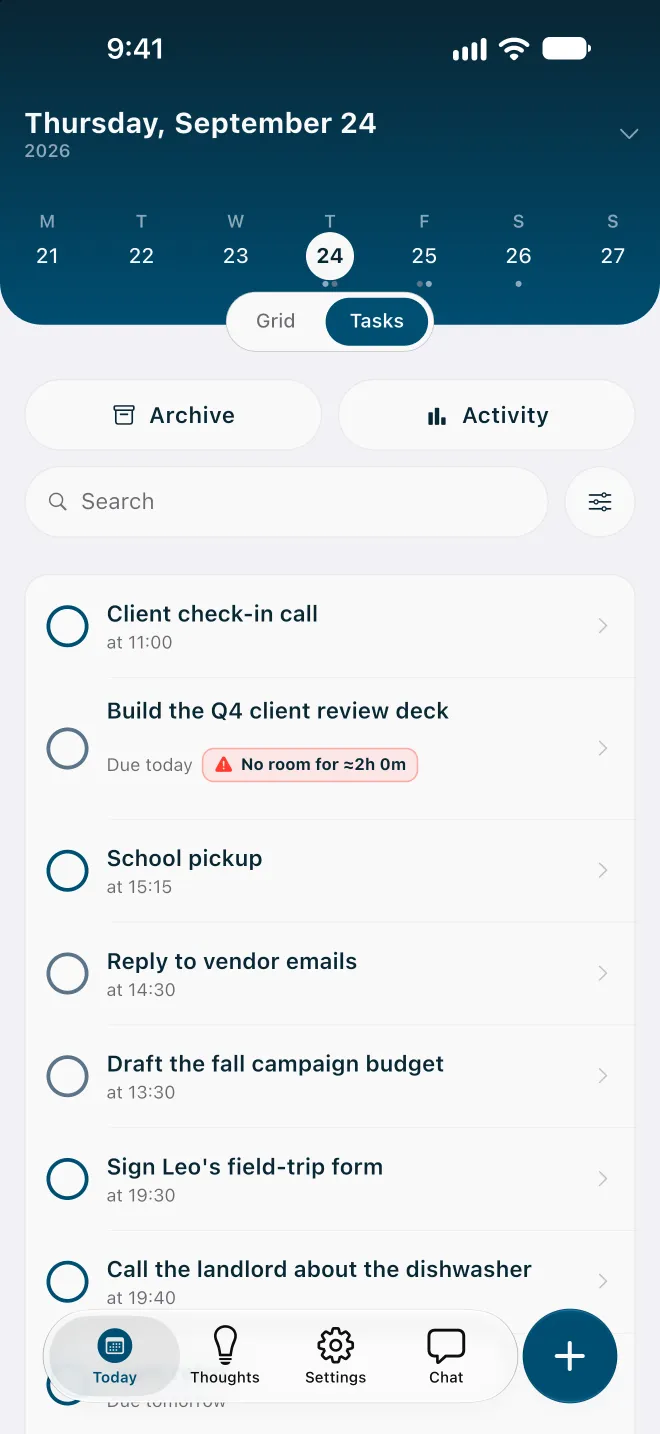
A Thursday. Working hours run from 9:00 to 15:00 because of school pickup at 15:15, with a client call from 11:00 to 11:45 and lunch from 12:00 to 12:30. The open work is a client review deck (2 hours, due today), a budget draft (1 hour, pinned at 13:30 because Sam needs it by 14:45) and vendor emails (30 minutes).
8:40. Everything is entered. The planner places the deck from 9:00 to 11:00 and the emails from 14:30 to 15:00. The budget stays at 13:30.
8:42. The 60-second review. Every block passes the "could I do this then" question. No edits.
9:05. A colleague needs an urgent fix. It takes until 10:50, and the deck has not been started.
10:55. Re-plan. The working time left today sits in short pieces: 15 minutes after the call, an hour after lunch and the half hour before pickup. None can hold two hours, and the pinned budget does not move. The deck is flagged as having no room.
10:57. The decision. The budget cannot wait, so the deck's deadline moves to Friday at noon. Re-plan again: the deck goes into Friday morning, and today keeps the call, the budget and the emails.
This is how Flowo handles that moment. Its scheduler runs on the phone. It places tasks around fixed events, habits, daily boundaries and category windows, and over time it also learns from the blocks you confirm which hours usually work for you. Blocks you pin stay where you put them, and tapping a block shows Why here?: what decided the slot and the next best one. When the day is too full, it first shortens rest, then meals, then sleep, down to the minimums you set, and a task that still cannot fit before its deadline shows a No room badge with roughly how much time is missing. The task stays on your list until you decide what to do with it. When you ask it to re-plan, it proposes new placements for unfinished work, and you can drag or pin any of them. The methodology page explains how placements are decided.
When this does not work
When the day changes every hour. On-call work or caregiving can make any plan stale within the hour. The review then happens several times a day, and a short list may serve you better.
When the inputs are guesses. A first-of-its-kind task has no reliable duration, and a plan built on a wrong estimate looks precise and is wrong. Expect to re-plan.
When placing the work is how you think. Some people decide what matters by arranging the day by hand. For them, an automatic plan can skip the part they found useful, and manual planning with the scheduler as a check is a reasonable middle ground.
When you stop looking. The over-reliance findings came from people who were busy and under time pressure (Goddard et al., 2012), which describes the days when a plan is most tempting to follow blind. If a week passes without a review, go back to step 4.
Limits of the evidence. The algorithm studies used paid forecasting tasks, and the automation-bias evidence comes mostly from clinical decision support. None of it tested a personal planner.
Questions
Is an auto-scheduler the same as an AI planner?
Sometimes, and the difference matters. Some auto-schedulers apply fixed rules, so the same tasks and constraints give the same plan, which makes their output easier to predict and check. Others use language models or learn from your behaviour, and many mix fixed rules with learning. The app's help pages should say which kind it uses.
What should I do when the app keeps putting a task at a bad time?
Treat repetition as a sign that an input is missing. If a task lands at 8:00 every day and you are never at your desk then, change the working hours or the task's window instead of dragging it each morning. A drag fixes today, while a setting fixes every day after.
Will I lose the habit of planning if an app does it?
No study here measured that. The automation research does show attention drifting when a system handles a task and other demands compete (Parasuraman & Manzey, 2010), which is the case for keeping a short daily review and making the trade-off decisions yourself.
References
- Burton, J. W., Stein, M.-K., & Jensen, T. B. (2020). A systematic review of algorithm aversion in augmented decision making. Journal of Behavioral Decision Making, 33(2), 220-239. https://doi.org/10.1002/bdm.2155
- Dietvorst, B. J., Simmons, J. P., & Massey, C. (2015). Algorithm aversion: People erroneously avoid algorithms after seeing them err. Journal of Experimental Psychology: General, 144(1), 114-126. https://doi.org/10.1037/xge0000033
- Dietvorst, B. J., Simmons, J. P., & Massey, C. (2018). Overcoming algorithm aversion: People will use imperfect algorithms if they can (even slightly) modify them. Management Science, 64(3), 1155-1170. https://doi.org/10.1287/mnsc.2016.2643
- Goddard, K., Roudsari, A., & Wyatt, J. C. (2012). Automation bias: A systematic review of frequency, effect mediators, and mitigators. Journal of the American Medical Informatics Association, 19(1), 121-127. https://doi.org/10.1136/amiajnl-2011-000089
- Hoff, K. A., & Bashir, M. (2015). Trust in automation: Integrating empirical evidence on factors that influence trust. Human Factors, 57(3), 407-434. https://doi.org/10.1177/0018720814547570
- Logg, J. M., Minson, J. A., & Moore, D. A. (2019). Algorithm appreciation: People prefer algorithmic to human judgment. Organizational Behavior and Human Decision Processes, 151, 90-103. https://doi.org/10.1016/j.obhdp.2018.12.005
- Parasuraman, R., & Manzey, D. H. (2010). Complacency and bias in human use of automation: An attentional integration. Human Factors, 52(3), 381-410. https://doi.org/10.1177/0018720810376055
Conflict of interest: the author is a co-founder of Flowo, a planning app. None of the studies cited was funded by or connected to the company.
Related: re-planning a day that has slipped, planning around classes, shifts and appointments, and how the scheduler works.
Flowo is free to download on the App Store for iPhone and on Google Play for Android, with optional in-app purchases.